
Introduction guide: task contexts
With this article, I would like to give you a different view of the task module in infra-struktur. Of course, you will find a to-do list in the infra-struktur solution, but what else can you do with it? Functions such as creating tasks, with and without an alarm, linking to a record, repetitions, creating tasks from other activities: all these aspects should be sufficiently explained in our documentation.
Here, my aim is to pick up the term context from the David Allen universe and to combine the task module with the lists in infra-struktur.
David Allen - Getting Things Done - contexts
Getting Things Done by David Allen, excerpt from Wikipedia:
Getting Things Done (GTD) is a self-management method by David Allen that is intended to enable its users to work efficiently and without stress. Among other things, it aims to capture a person’s entire everyday life with context-based task lists. The main principle of the method is that users note down all their upcoming activities in a management system, which frees their mind for more important things, namely completing the current task, without having to fear forgetting other tasks.

It helps to create several task lists, depending on the environment you are in. The trick: use contexts for these environments. If the environment, i.e. the context, is the supermarket, the tasks get milk and check potato prices should carry exactly this context.
In practice, there are hardly ever more than 10 contexts; otherwise you have not understood the principle. Examples are: @Office, @Computer, @Phone. You can of course define the environments a little more broadly, move away from the physical location and define a context such as @Customer, i.e. everything to do with the customer, or @Strategy if you have created tasks related to corporate strategies. Fields of work such as @SoftwareDevelopment can also be useful.
Contexts are a hotly debated topic in the GTD community. A context describes a set of resources and physical conditions that are necessary to work through a list of tasks. All tasks in a context can be worked through one after the other when the resources are available. Working on similar tasks together saves time by making optimal use of the existing conditions.
Contexts define the resources, framework conditions or prerequisites needed for a set of tasks. Contexts can be divided into the following groups:
- Places: @Home, @Office, @OnTheGo
- Services: @Calls, @Mail, @Mac, @Mobile
- Tasks: @Planning, @Research, @Development, @Analysis
- People (groups): @Family, @Friends, @Colleagues
- Status: @Waiting, @Reconsider, @Paused
- Energy: @LowEnergy
- Time and attention: @Routine, @Focus, @Short, @Long, @InBetween
- Fields of work: @Design, @Programming, @Draft
- Mode: @Leisure, @Work
Tasks for actions
The infra-struktur home page contains a lot of information that affects my working day. E-mails come in, customers want to be called back and much more. With all the information that pours in on me, you should ask yourself: is this information or an action?
So if, for example, an e-mail arrives saying “... just so you know ...”, it is probably information: read it, understand it, mark it green, done. Another example is a call saying “... if you ... then I would like ...”. Here, in contrast to pure information, we are talking about actions: you are supposed to do something specific so that you can mark the activity, here the call, green at the end.
As soon as influences from inside (colleagues) or outside (customers, suppliers) trigger an action for you, you should take the call or the e-mail, create a task and give it a due date. Strictly speaking, everything that comes in should be turned into a task straight away and given a person responsible (task for) and a date. This way, yellow and red activities do not sit around on the home page forever but are planned specifically straight away.
Now the question is: when do you create tasks, when not, and what does this mean for the delegate function in the infra-struktur software?
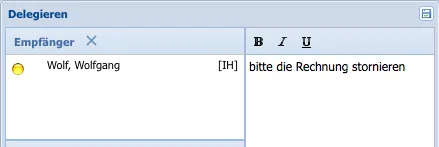
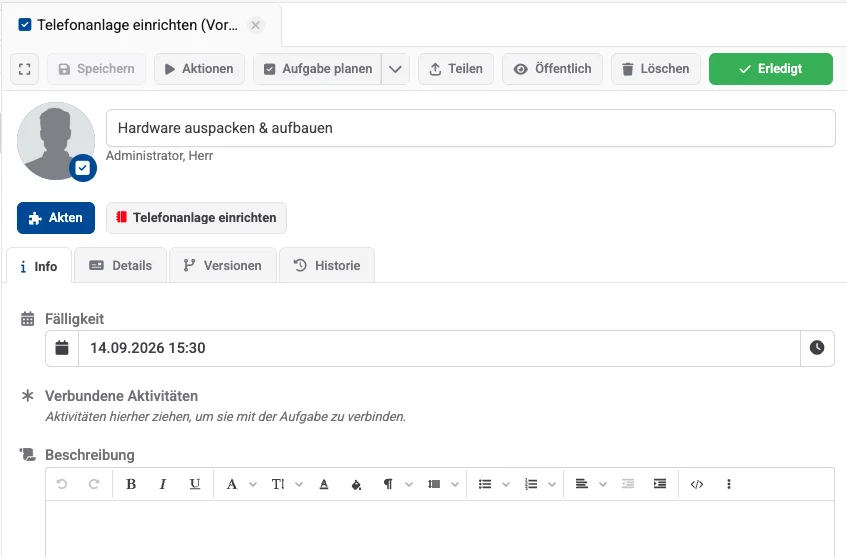
Of course, if an e-mail comes in and the action is to write a reply, you will not create a task but reply straight away. Here, above all, the 2-minute rule by David Allen applies. But if the medium changes, for example a call turns into a request for a physical postal item, that is an indication of an action you can handle with tasks. An asynchronous process also points to an action, i.e. creating a task for an incoming activity. For example, the call says: “Please get back to me about this at the end of the year.” So whenever things do not “run through” directly, but processes are interrupted and have to wait. Sometimes it is a check, which often runs asynchronously, such as: “Has he replied to my e-mail?” This could be an action and therefore a task.
All of this, of course, on the condition that actions have a certain minimum size, a certain minimum effort, and that the asynchronicity has a time lag that is large enough. So it can also make perfect sense to delegate an e-mail with the note “please write a reply” without creating a task straight away.
Basically, strictly speaking, the home page should be empty by the end of the working day at the latest, because you have created whatever is still open as a task for others or for later.
Tasks with context
Following GTD, you can easily give all tasks contexts. Simply think of a list of possible contexts in which you work:
- Customers
- Partners
- Employees
- Bank
- Business administration
- Strategy
- Office
- Working from home
So these are the contexts of your daily work. By the way, you will also see what you really do in the company ;) You should only define as many contexts as you can remember; that protects against an inflation of contexts.
Now try to add this context to every task title in a short form (e.g. 2 letters); after all, you do not want to type too much. Put a special character such as @ in front of it so that you can search for it more easily later. A list of short names could look like this:
- Customers (@cu)
- Partners (@pa)
- Employees (@em)
- Bank (@bk)
- Business administration (@ba)
- Strategy (@st)
- Office (@of)
- Home office (@ho)
Whether you write the short form of the contexts before or after the title is a matter of taste. Here are some example tasks with context:
- Staff appraisal Mr Mayer @em
- Sales concept @st
- Visa receipts to tax adviser @bk @ba
- Inform marketing agency about changes @pa
- Customer Schmidt still needs documents @cu
- Something I could do at home @ho
As you can see, you can of course also give a task several contexts and separate them with spaces.
Lists of contexts
If you now take the organisation menu and look at the lists, this is where the combination comes in. In the task module, you search for @bk and save the result via “Listen” (Lists) and “Liste unter neuem Namen speichern” (Save list under new name) as the list @Bank (@bk).
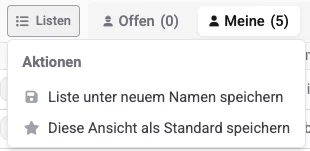
In the organisation menu, a collection of lists matching the contexts then builds up under “Listen” (Lists). You can recognise lists from the task module by the label “Aufgaben” (Tasks).
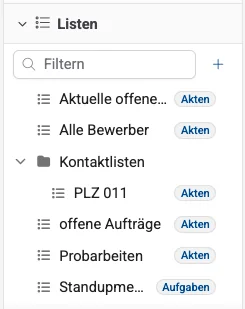
By clicking a list, you now call up a targeted list of open tasks belonging to one context. So from the list of many tasks, you can first concentrate on tasks that belong to Bank, then it is the employees’ turn. If you are going shopping anyway, you may find in this context the things you want to get anyway.