Introduction guide: permissions for digital records (formerly data records)
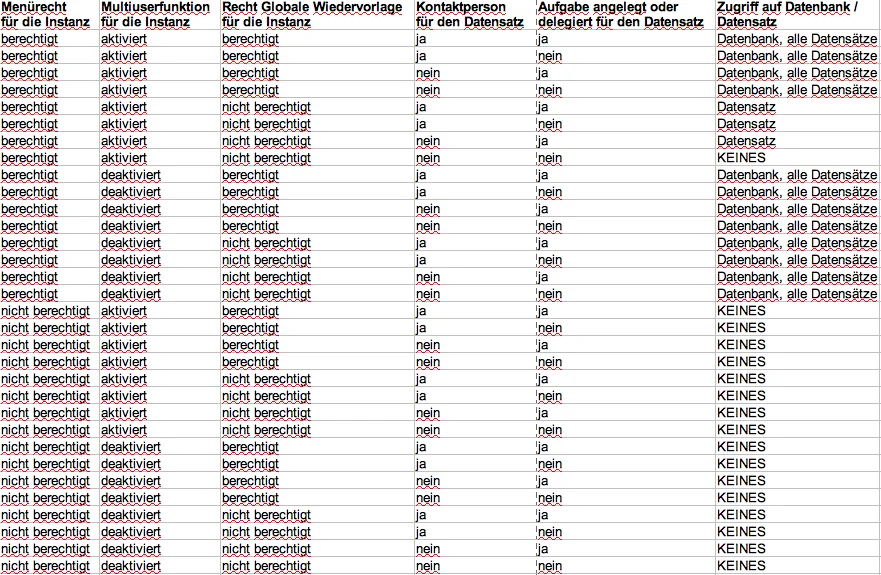
(A) If the menu permission is set and the permission for the global follow-up is also set, the user has full rights to see the digital records. They can search for, find, open and edit records and link activities to them.
(B) If a user has no menu permission for a record instance, they also have no way of seeing or opening any of the digital records of this instance. Neither in the table view nor in the search when linking, etc. There is also no way of unlocking a specific record for them.
(C) If the menu permission is set but the permission for the global follow-up is not granted, there are two ways of passing a record specifically to a user:
(C1) The user is selected as the contact person in the record
or
(C2) The user has a task that is linked to this record.
In both cases, the user can search for, find, link and open the specific record. The permission for the individual record is exactly as under (A).
The permission is granted either because the user is the direct recipient of the task or because it has been delegated to them. Archive permission for a task is not sufficient for any permission to see the attached record.
Linked appointments or activities have no effect whatsoever on whether a record may be seen without permission for the global follow-up.
(D) If the multi-user function is switched off for an entire record instance (in the administration under “Zusatzfeldverwaltung” (additional field management)), all records are generally visible to all users who have the menu permission for this instance. The multi-user function is therefore the basic prerequisite for digital records to be selectively visible and opened on a per-user basis.
Permissions matrix