
Ideas for a tidy home page
The home page, as your “cockpit” and the starting point of your working day, should not be too full and should really only contain the information you currently need for your work.
Things that are done are set to green; information that is only needed later is scheduled, for example via a task.
A “tidy”, i.e. “short”, home page is the prerequisite for organised, structured and efficient work.
You should do the following things every day; then the home page is “clean”, tidy and can offer you all its benefits.
1) No information is older than 3 days at most
On the home page, you should check strictly how old a piece of information is. Anything that is not used or dealt with straight away can be created as a task and delegated for later. To do this, simply create a task in the e-mail or call via the “Aufgabe planen” (Plan task) button; the task is then linked to the original e-mail etc. straight away.

Creating a task with the right mouse button makes it even quicker. You are reminded of your activity on exactly the right day and so have it back on the home page later: the “original activity” is linked in the task you created, and it, in this case an e-mail, can then be opened directly in the task via an icon.
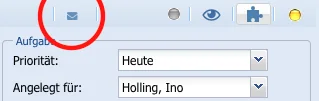
In this way, you can of course also delegate things to others and have them appear on their home page at a set time.
2) Do not create several loose ends
Are there several pieces of information / sources on one topic?
Has a customer called, for example, and written an accompanying e-mail?
Are there several e-mails on one process with the customer, i.e. various replies?
Tidy up, mark information green and keep only the latest one on your home page. Only the last reply is important, because it usually contains all the previous ones too.
For this, use the filter function at the top, for example, and search for “Holling”. All activities and information about and from “Holling” are displayed. Tidy them up. In the same way, you can search for a process number (as in this example, 0-8-15) or for a topic, for example, in order to mark “duplicate information” green.
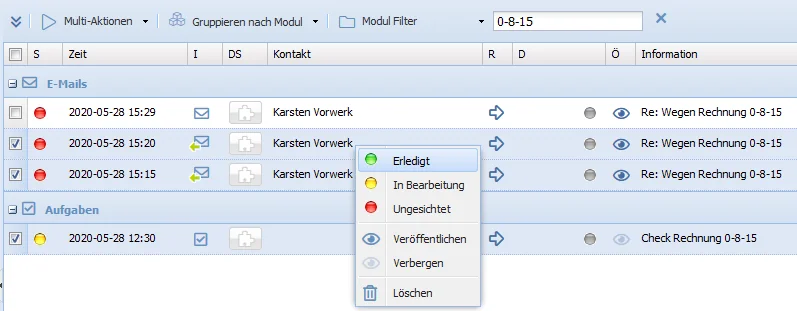
3) For every red dot, check “why is this dot here?” / “What do I let into my life?”
Are there, for example, useless newsletters that you click to green unread 99% of the time? Unsubscribe!
Are there notifications set up by message or e-mail that have not really turned out to be useful? Deactivate them!
This ensures that pointless information does not reach your home page as a red dot in the first place.
4) Do not use the home page as a reminder function
If you want to “remember” information on certain topics, leaving it yellow or red on the home page is the wrong way. After all, the home page only contains things that you need to tackle or complete in the short term. The home page is a to-do list, not a general pool of information.
Besides the digital records, the binders, which you can create via the organisation menu, are particularly suitable as “information collectors”.
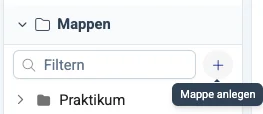
Here you can also create hierarchical structures with “sub-binders” on specific topics. Simply drag and drop the information, whether e-mails, calls, messages, documents or whatever, into the relevant binder as a “collection container” and mark it green. The information remains in the binders regardless of its colour status.
With one click in the organisation menu, you are then in your topic binder, with all the information you have put there. The home page is free of it.
If you want to use object records instead of binders, you even have the option of creating tasks in these records so that you are reminded specifically of the topic or the linked information. Perhaps even regularly with recurring tasks.
Interesting advertising, for example, which you receive by e-mail every now and then, could be linked to an object record of the same name. If this is a favourite record in the organisation menu, this is just as quick as moving it into binders. Your recurring task on Friday afternoon then regularly reminds you to look through the advertising.
5) 72-hour rule
Do not keep “things” on the home page that you want to “do at some point”. Do not “put anything on the back burner” there for later.
The 72-hour rule says that things that are not tackled with a first step, even if only rough planning, within 72 hours of receiving the information, having the idea or the impulse, will almost certainly never be realised. Or, to break it down to infra-struktur: at least create a project record with the most important information and the next task to document it and give a basis for completing it later.
So the “project” does not have to be “started” straight away, but create the basis for completing or implementing it later.
This lets you mark the original activity green, but you will be reminded of your project later, for example by a task.
6) 2-minute principle
On the other hand, there is the 2-minute principle:
Anything that can be done within 2 minutes is done immediately. A short reply by e-mail, a piece of information a colleague asked for... Do it... Mark it green...
7) A red dot does not mean “particularly important”, but “information is new”
Do not leave important information in the signal colour “red” on your home page. “Red” generally means: new, unseen, not yet noticed.
After reading, information should be clicked to “yellow”; if it is particularly important, schedule it for later and file it in the records where it belongs by topic.
You could also create a binder “Important information” at the same time, which you can access quickly if necessary, but which you also have to “tidy up” once things are done or out of date.
8) In the evening, not a single dot is red and the home page is 1 page long
End your working day by actively spending 2 - 3 minutes “tidying up” your home page. Check every single red and yellow dot against the criteria above. Reschedule things, file information.
This not only ensures that you recap your working day and may notice things that you still need to consider, discuss, delegate or schedule; it also organises your way of working, which shows in a short and clear home page.
If necessary, give customers feedback by e-mail that you will get back to them tomorrow or that you have passed the matter on to a colleague. Then the customer is informed and knows that their request has not been forgotten, and you have at most a yellow dot left, but no red one.
9) You have to tidy up every day; you must not give up at some point
It is important to follow these rules every single day and to work on the topic actively and systematically every day. Of course, this requires self-discipline at the beginning. At the beginning, it may take 5 minutes a day. In the long term, however, it saves you time: you become faster, are better organised and find information again more quickly.
It will be much harder to have to tidy up a home page of 100 dots at some point than to look once every day at what really needs to be on the current to-do list, what needs to be in your view and therefore currently in your head.
Instead, use the possibilities of your infra-struktur, forget things that are not relevant today and concentrate on what matters now or today. The system reminds you of everything else, if you wish to the minute with an alarm, and brings it back onto your home page and thus into your head.