
For users
Maintenance update, week 50:
Shortly before Christmas, one more small adjustment for all sipgate customers (new API connection), but also with a few small bug fixes for everyone.
We have another big update for you, with many highlights, improvements and bug fixes.
Lots of the ideas come straight from our users, and some of you will recognise your own here.
Some of the big new features are the extended online list, which now also draws on the appointments in your calendar and where I can also see the users who are not currently logged in, so that I can delegate information or send messages to them by drag and drop.
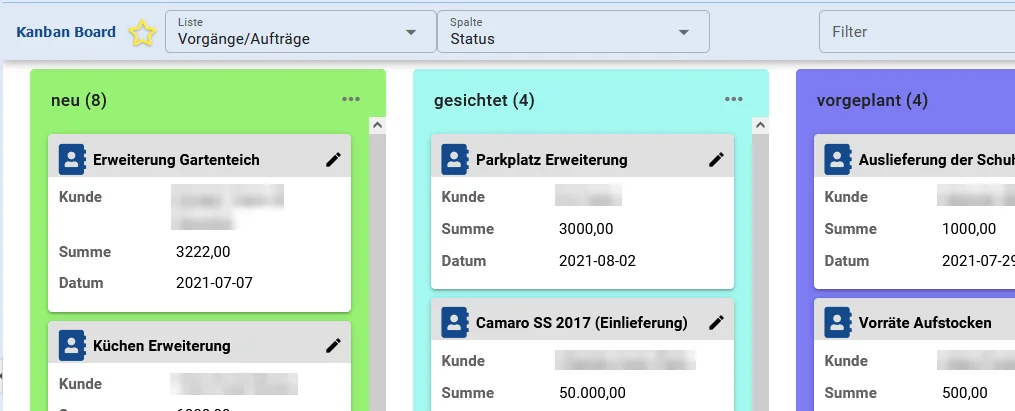
A special new feature is also the option to display any saved list from your digital records as a Kanban board. This lets you move processes through their stages very easily by drag and drop. This is described in more detail below.
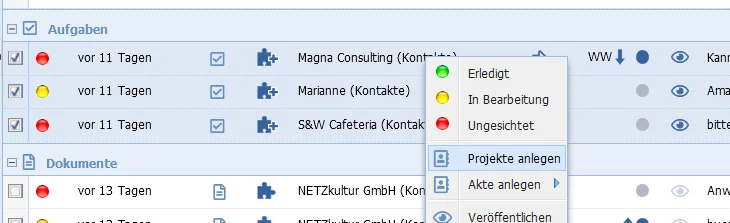
Linking (“verpuzzeln”) is always an important topic and improves the quality of the data. To start processes even faster, you can now, from anywhere, put any number of selected items of information into, for example, a new project with a right-click, or into any other type of record you use.
On top of that, there are plenty of small features meant to make your life easier, such as enabling the dialling function via callto on any computer, e.g. for a STARFACE client, or the option to create new statuses for the online list yourself, and much more.
Here are all the details of this update.
Personal settings
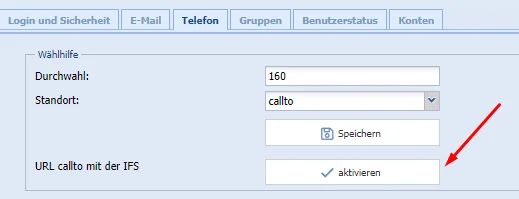
- under phone, you can set with one click which application you want to use for calling out if the so-called callto protocol has been set up for you. E.g. for STARFACE UCC clients or other softphones.
- Under user status, you can set your own presets for the online status for all your colleagues. We provide hundreds of icons there that you can then use in any colour. They can be searched by topic using a text filter (in English). Agree with your colleagues on what they need.
- When creating signatures, a euro sign could sometimes appear as a question mark. This has also been fixed.
General
- Quickly create a record of your choice from any activity in infra-struktur. Perhaps you have a few calls and e-mails on the same complex topic? Select the items on your home page, and with a right-click you get the option to turn them into a project, for example. Perhaps you also use infra-struktur to manage quotations or for repair tickets. Or you can simply create a new customer from their first enquiry.
- The online list now shows, to the minute, when you have an appointment in the calendar.
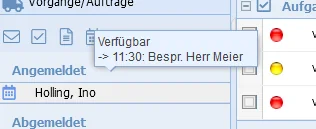
- Below the familiar online list, there is now also an “offline list”. Why? We have given the list more and more functions (writing messages, delegating by drag and drop), but that is no use to us if the colleague is not currently logged in. With the “abgemeldet” (logged out) area, all colleagues are now available to you for this.
- In a few places, the function and performance of the puzzle button have been improved further.
Digital records
- The new option to open any list as a so-called Kanban board. You will find a new icon for this at the top of your infra-struktur, and also in the record lists and under organisation in the right-click menu of each individual list.
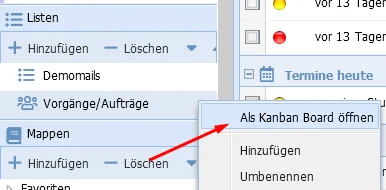
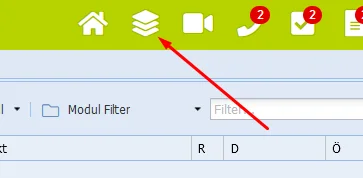
You will find more information on the idea behind it and how you can use it here.
- If you also use the current user’s e-mail in the print function, your default address is now inserted there.
- The columns can now also be sorted in the print tab of every record.
- In some cases, the list for the geo map no longer showed any content. This has also been fixed.
- Until now, the top toolbar in the digital records could not be scrolled. That was a problem at low resolutions, and we have improved it.
Call list
- The evaluation of which caller is most likely to be calling from a phone number has been improved and refined further. If several callers are possible for one number, the one shown directly is decided by how often they called within a certain time window.
- If you used faxes via the service provider clicksend, you can now use this again. (For all the younger ones who no longer know what a fax is: information here)
Calendar
- For some users, sending appointment invitations did not work. This has been fixed.
Documents
- Under certain circumstances, the red/yellow tab of the document management did not show you all red and yellow documents. That works again now.
- When a new version was uploaded, any umlauts used in the title were saved incorrectly. Fixed.
- In some cases with more than 100 versions, the wrong version was downloaded. That has been fixed too.
Mail centre
- The red/yellow tab did not show e-mails if you had taken them on with “übernehmen” (take over) or delegated them to yourself on the home page. We have just straightened that out.
- After we improved a few things in checking e-mails for harmful or broken content in the last update, regular content was sometimes not displayed completely. This has now been optimised. All for your security.
- Storing contact pictures sometimes broke off. We found the problem and solved it.
- If the musketeer D’Artagnan were an infra-struktur user, he would be pretty annoyed. The apostrophe in his name would have caused problems when writing e-mails. Even though he isn’t a user and probably never wrote an e-mail, we have fixed it anyway.
- D’Artagnan would also have had problems naming templates with his surname. But now it would work.
- You can now “bounce” e-mails to other mailboxes. You may be wondering, “why would I do that?” There really are numerous use cases. For example, if you use a ticket system that processes e-mails automatically and your customer sends a request to your personal mailbox, you can redirect the e-mail with this. Or perhaps you have a partner who unfortunately doesn’t have infra-struktur; then you can redirect original e-mails on their way into their mailbox without changing the e-mail as you would when forwarding. The e-mail simply turns green for you. If you think of a special case like this, feel free to get in touch with us. We will be happy to advise you and, if appropriate, set up the function for you.
- Sometimes e-mails may have been copied directly into a mailbox without the recipient even existing in your infra-struktur. These e-mails then lacked important functions such as delegating or the “eye”. These e-mails can now be processed fully too.
For administrators
Mail centre
- There is a new beta version for retrieving e-mails from Office 365 accounts, which you can have us activate for you. We will now quickly test as much as possible so that we can then release it for good. Our colleagues from Redmond didn’t make it easy for us with constant changes to their APIs, but now we have been able to get everything out of it that was possible.
- Sometimes a deletion limit that had been set did not take effect for sent e-mails, and all e-mails remained on the mail server. Deleting works again.
Calls
- If you use a telephony system that can be called via a callto link, it can be stored as the dialling function with this value.
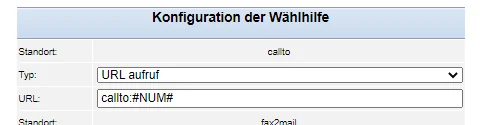
Users then only have to select the location and from now on can choose the right application with a click on a button in the personal settings and save it as the default. You will find details on this in the release notes for users.
Documents
- In the matrix under “Benutzer zu Ablage” (user to filing location), the click did everything correctly, but the colour of the field did not change live. Everything works again.
Web service
- The current status of one user or of all users can now also be read via the user web service.
- The status can now also be set via it.
- You can now also read unread messages via the web service and send replies to messages.
Kanban board
A special highlight of our update is the new Kanban board. It is now available to every infra-struktur user. The basic idea is to display records not just as lists but also as clear boards.
The aim is to grasp the most important things at a glance:
Who is doing what right now?
How far along is the order?
What’s next?
Where is the deadline getting tight, and why?
Where is support needed?
Who can help?

Example: workshop
Basically, it can be applied to many areas and industries. As a possible example, let’s take the workshop of a bicycle dealer.
Various repair orders come in, which are handled by several employees. How do you keep track of who has to do what and when? The Kanban board is ideal for this!
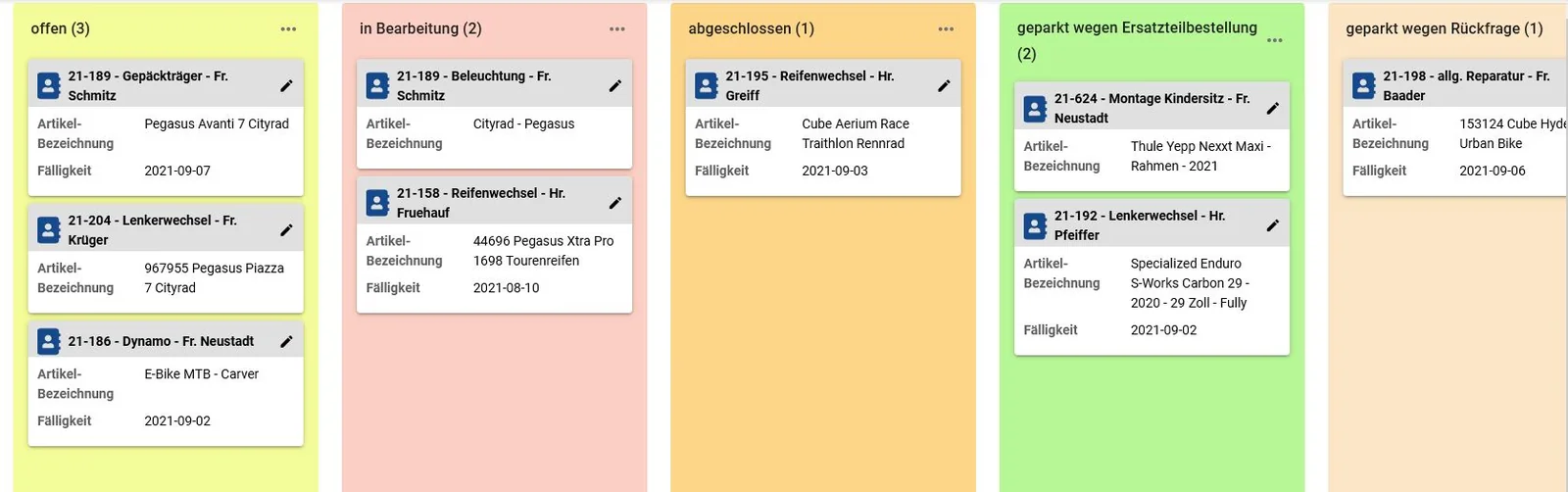
You can see the state of play at a glance.
By moving the items horizontally from column to column, you can change the status, for example (open -> in progress -> completed). The order within a column can be set by moving items vertically. This way, for example, the head of department can decide which order is next in line or has higher priority.
“Start with what you are doing now” is the basic principle of Kanban. This principle contains two factors: you start with what you are doing now, and you finish the current work before starting something new.
So the mechanic only has to take the top item from the open pile and move it to in progress. All the information needed is already in the repair data record. As soon as he has finished, the mechanic moves the project to “abgeschlossen” (completed). The status changes as it is moved. That way, everyone in the system knows the current status of the order straight away.
The principles of the Kanban board
- Visualising the work process
- Limiting unfinished work
- Work passes through the columns
- Monitoring, adjusting, improving
The Kanban board can be used for many different areas. The basic element of the process to be mapped is the selected lists.
- Company cars, sorted by when the next inspection is due
- Projects, sorted by week
- Customers, sorted by birthday
- Rental equipment, sorted by rental status
- Orders, sorted by employee
What records do you create lists for? What kind of records do you use? Feel free to talk to us. There is no limit to the ways you can map and use your processes with digital records.
More information on digital recordsMore information on lists and filters