
With this release of the Smart version we consider it fully usable, as we have now taken over almost 95% of the functions from the classic version, alongside many new functions.
The version can be used completely in parallel with the classic version. So there is no “there’s no going back” here, as you often know it from other systems.
Feel free to test it, and we look forward to your feedback. Please send it by mail to the familiar support@netzkultur.de
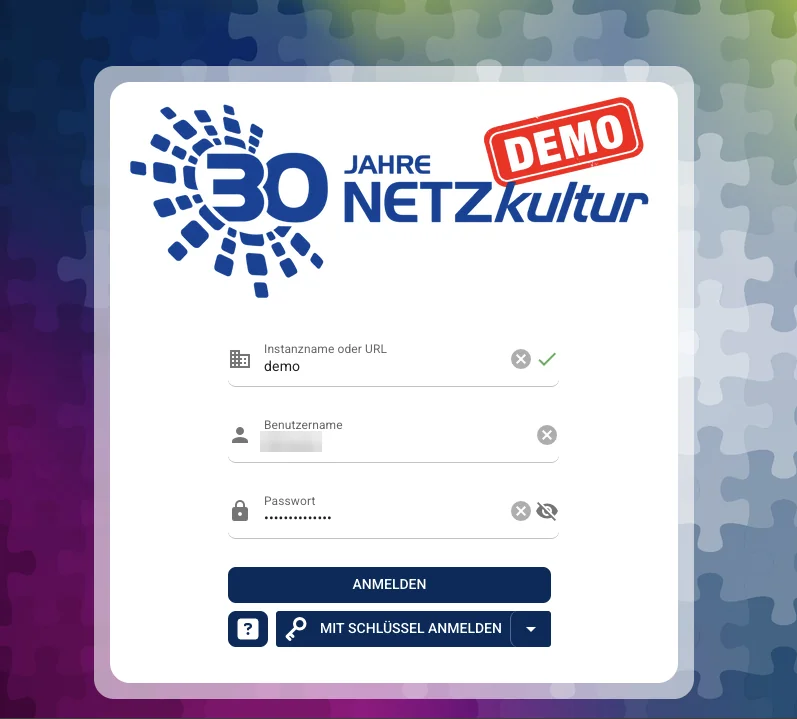
Everyone opens the new version in the same way via https://infra-struktur.app. Here you can log in with your infra-struktur login details. The instance name is what appears in the address (URL) before infra-struktur.eu in the classic version. In this example, the instance name is “demo”.
Very important: all new functions described in the classic release notes always apply to the Smart version too. Only the other way round, the new version allows many new functions that technically cannot be integrated into the classic version.
Now here are the details of this update. For those of you who are seeing this version for the first time, only the new functions are interesting, of course. That is why they are described separately here.
The app and Smart version have once again received a sizeable package of improvements. This time it is mainly about faster routes, clearer screens and lots of small things that are simply less annoying in everyday work.
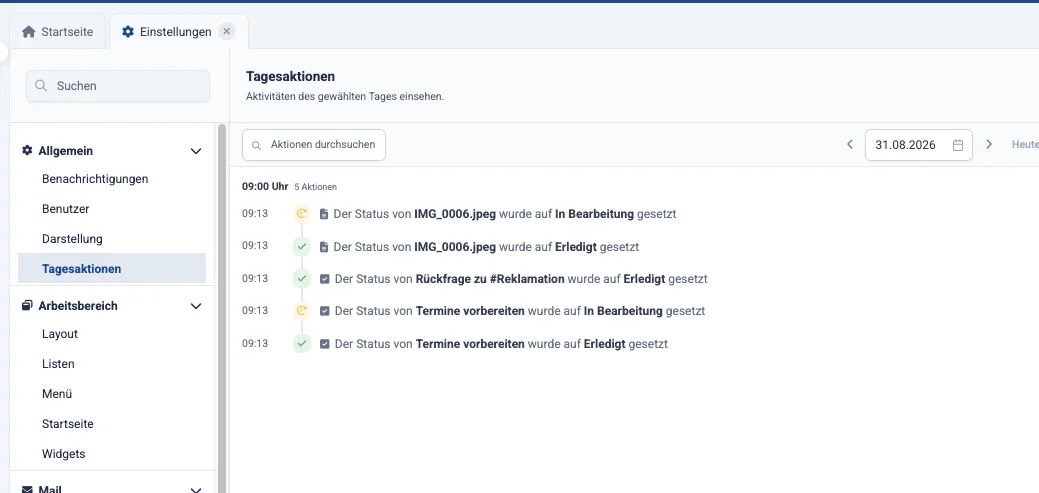
One highlight here is surely the new personal function “Tagesaktionen” (daily actions), where I can see, for example, which items I clicked to green or which items I delegated. This lets me find mis-clicks very quickly and correct them.
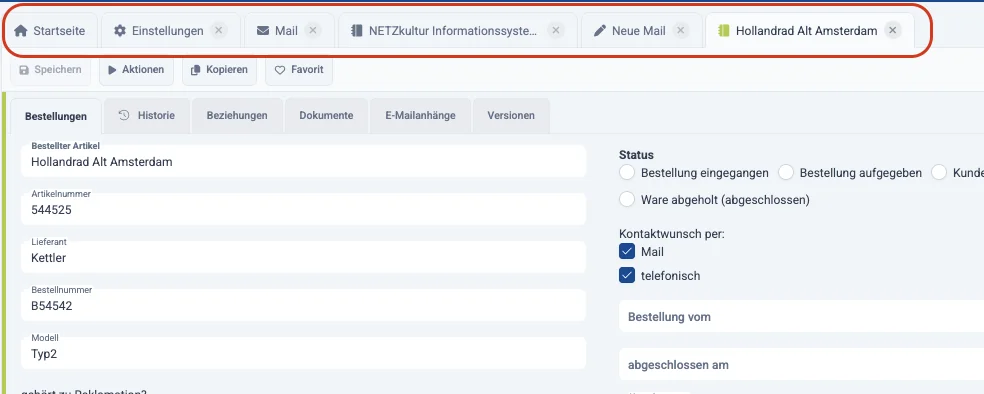
If you have missed the “intabs” from the classic version, you are in for a treat. They are back:
As always, you will find all the details here.
General
New functions
- Preferred default views can now be set for lists. In the calendar, for example, you land directly where you like to work best.
- Lists, histories and activities can now also be exported.
- A default font and font size can be set for the editor.
- Your own lists can now be set as the default.
- For e-mails and calls there is a quick contact history in the context menu. So you can find further messages or phone calls for the same address or phone number in just a few clicks.
- A new history aid makes it easier to jump back quickly to recently opened areas.
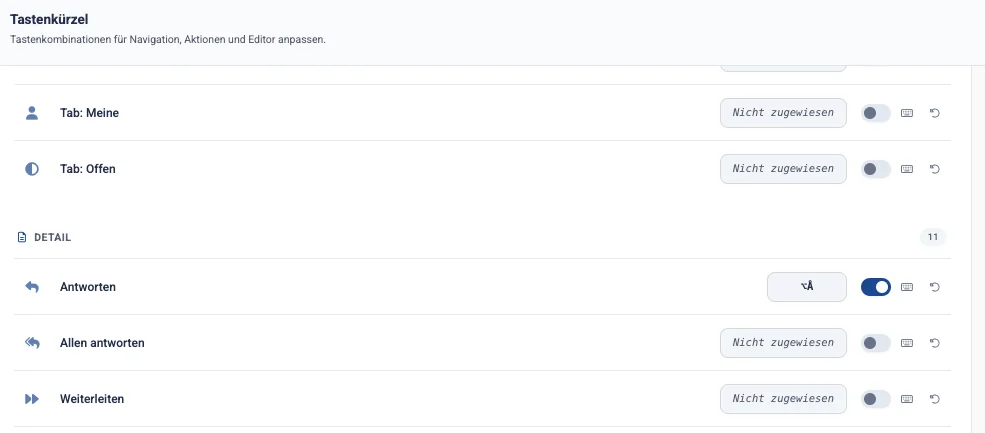
- You can now define your own system-wide keyboard shortcuts, for example to open a new mail quickly. Here are just a few examples:
Improvements to existing functions
- The Smart and web versions now also get along properly when different users are logged in in the same browser.
- The app recognises more reliably whether something has really been changed. Unnecessary prompts to save are now a thing of the past in many places.
- Where content is still loading, we now show this more clearly. So it is quicker to see: something is still coming – or there really is nothing there.
- The dialog for unsaved changes can now also be cancelled. An accidental click on the X is no longer a one-way-street moment.
- The text editor has been reworked considerably. Pasting, formatting and writing run more smoothly and without the odd creative blank line.
- In selection fields you can now find contacts not only by surname but also by first name.
- We have tidied up the interface in many places: spacing, labels, colours, tabs and buttons are now more consistent and easier to use on small screens.
- Statuses can now be recognised not only by their colours but also by icons and clear labels such as “Ungesichtet” (unseen), “In Bearbeitung” (in progress) and “Erledigt” (done).
- When you open a module, we first show the open entries. If there are none, it automatically continues with “Meine” (mine) and then “Alle” (all).
- Checkboxes in lists appear when you hover over them with the mouse. This makes it quicker to select several entries.
- The modules now have a plus button for new entries directly. The familiar “Neu” (New) button at the top remains, of course.
- In the editor, text colour and background colour are now easier to tell apart.
- Texts are displayed properly again when sharing and delegating – cryptic formatting leftovers have no business being there.
- Filtered lists update automatically again after changes. Anything that no longer matches the filter disappears without an extra search.
- Double-clicking a desktop notification takes you straight to the matching entry again.
- Selection fields on the smartphone have been optimised for use with a keyboard and a small display.
- In selection fields the cursor now lands directly in the search field. Open, start typing, find – without an extra click.
- Delegating back works again across tasks, documents, e-mails and notes – also to people who had already edited the entry before.
- For a single day, one click in the date selection is now enough. If you need a period, you can of course still select a range.
- Changes in detail views are reliably recognised as changes again and can be saved.
- Umlauts and special characters are displayed quite normally again in further places.
- When you go back from a record, you land where you expect again – instead of surprisingly in the wrong tab.
- The action icons in the app have been tidied up so that important functions do not disappear needlessly into the three-dot menu.
Settings
New functions
- The date format can now be set to suit your own language or region.
- The language can be set per user. On first launch, the app automatically follows the language of the device.
- You can now also change your own password directly in the Smart and app version.
Home
New functions
- On the home page there is now a permanent personal notes field for things you are guaranteed to need in a moment and otherwise guaranteed to forget.
Improvements to existing functions
- Appointments on the home page can no longer be switched to “green” by accidentally clicking the status.
- Shortcut tiles now show their font colour in the preview to match the chosen background colour and the light or dark design.
- The entry point is now clearly called “Startseite” (home page) everywhere and has also been given the matching icon.
- Saved shortcuts now stay where they belong and no longer occasionally disappear by themselves.
- The loading icon on the home page has been toned down. Less puzzle disco during normal work.
- The home page can now be personalised again – for example, which documents, calls or storage locations should be shown there.
- For favourites, “Alle anzeigen” (show all) works as expected again.
- Selected entries on the home page stay selected even after a refresh.
Digital records
New functions
- New record lists can now be created directly in the app.
- You can create a new data record directly via the context menu of a record list.
- The relationships tab is now also available in the mobile view.
- Record lists can now also show a totals row at the end of the list.
- The familiar record selection window is now also available in lists.
- Records now have their own overview of e-mail attachments. This makes invoices and other files much quicker to find.
- The selection of record areas now has a text filter. Especially with many entries, this saves a lot of scrolling.
- The handy context menu with the familiar actions is now also available in tables within a record.
- A new day view helps you follow the changes and activities of a day more quickly.
- RTF templates from the printing area are now also available in the Smart version.
- Records can now be copied directly.
Improvements to existing functions
- Sharing and linking can now also be reached directly via the context menu in lists.
- Entries can be hidden or made visible again directly via the corresponding icon in the list.
- Formatted content is now displayed properly in records and links.
- Record favourites can be edited directly in the menu and via the context menu.
- The status of entries is easier to recognise in the record history.
- Markings and highlights in records are now shown in a clearer and more consistent way.
- Selection fields in records can be reset to “keine Auswahl” (no selection) again.
- The filter options in records have been extended and brought into line with the familiar options of the classic version.
- The column selection for record lists works reliably in the app again.
- When starting an e-mail directly from a record, the matching e-mail template is loaded again.
- In the compact record history you can again see at a glance whether an entry is, for example, a mail or an appointment.
- Opening records and the record selection have been reworked and are now clearer to use.
- Changed filters in records are taken into account immediately again when applied.
- With many contact persons, the contact persons tab can be scrolled in full again.
- The relationships tab has been repaired: sorting, paging and the number of entries shown work properly again.
- The Kanban board remembers the board you last used and opens it directly next time.
- The “Anhänge” (attachments) tab can be scrolled in full again.
- Documents once again have their own tab in records with the familiar categories. So the right files are just one click away.
- Selection fields in the smartphone app show the actual values again instead of an unhelpful “true”.
- When selection values are renamed, the old labels no longer stubbornly turn up in filters.
- Updates in the background no longer wrongly mark a form as “changed by you”.
- The record screen has been visually refreshed and looks less grey on grey.
- If you work with several tabs, after closing one you now land more reliably back where the new tab was originally opened.
- In the relationships tab you can again open the relationship history directly via the context menu.
Tasks
New functions
- Activities can be added directly to a task by drag & drop.
- A task can now be linked to several activities.
Improvements to existing functions
- An activity now shows if a task has already been created from it.
- When creating a new task, the mini calendar is back in the right place and can be fully operated.
Calendar
New functions
- The personal iCal link can now be generated in settings -> calendar -> export.
Improvements to existing functions
- The calendar search finds appointments again and has been improved for “Meine” (mine) and “Alle” (all).
- Reminders for appointments can again be set correctly to a specific time.
- The mini calendar closes sensibly again after selecting a date, instead of getting in the way unnecessarily.
Mail centre
New functions
- Many e-mail addresses can be inserted into To, CC or BCC at once – for example straight from an Excel column.
- When writing an e-mail, you can link the matching record directly. The detour via the outbox is no longer needed.
- Newly uploaded attachments can already be viewed in the compose window.
- Replies within a mail thread can now also be shown in Smart and the app.
- Signatures can now also be created and edited in the Smart/app version.
- Attachments can already be opened in the preview while writing an e-mail.
- E-mails can now be printed directly.
- Linked e-mails can already be published or hidden in the compose window.
Improvements to existing functions
- For e-mails with several attachments, you can now also look through all attachments in the preview in the app.
- E-mails can be taken on properly even when several users have access to the same mailbox.
- When writing an e-mail, the recipient search now also finds groups.
- E-mail messages are displayed completely and legibly in the app again.
- Contact pictures can again be taken from e-mails by drag & drop, without the picture simply opening in the browser.
- The e-mail search has been extended. You can search more specifically by contact, subject, file type and further details.
- When you hover over a sender or recipient, the list once again shows the actual e-mail address – handy when a name alone does not help.
- The compose window has been tidied up. The editor takes up less space and important functions are arranged more clearly.
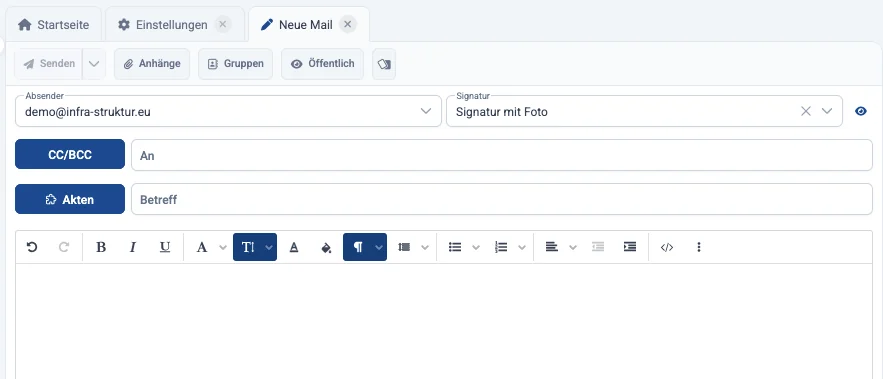
- “Allen antworten” (reply all) no longer accidentally also sends the reply to your own address.
- When pasting multi-line text, the compose window no longer jumps wildly around the layout.
- “Später senden” (send later) works again, including date, time and properly closing the selection window.
- Saved e-mail lists now also remember the extended search criteria.
- With auto-delegation, the desired mailboxes can be selected again.
- “Als neue Mail senden” (send as new mail) once again opens a new mail with the expected content.
- The signature editor behaves properly again when navigating with the arrow keys.
Calls
Improvements to existing functions
- When pasting text into a call, disruptive formatting is removed. What you paste simply stays readable text.
- The time of a call stays visible in the call list even when you switch to another day.
- Phone numbers in the format “+49 (0) …” are now dialled correctly. Small zero, big effect – and no more unplanned long-distance trips.
- The fields for editing a call have been neatly aligned and arranged more clearly.
- Changed caller names are now saved reliably.
- The contact person of a call can be changed and saved again.
- In the call list, you see the associated phone number when you hover over a name.
- The area is now consistently called “Anrufe” (calls) – in the tab too.
Documents
New functions
- Documents can be uploaded conveniently by drag & drop in the browser/Smart version. Reusing them by e-mail has also become easier.
- Documents can now be shared with external people via a link; upload links can also be provided for storage locations.
Improvements to existing functions
- The document search works again.
- The document list updates correctly again after uploading.
- Newer document versions can be deleted via the bin again. For the original version, the app clearly shows why this is not possible.
Messages
Improvements to existing functions
- Messages now have quicker handling around “Senden” (send) and “Merken” (remember), on the smartphone too.
- The message window has been optimised for small displays and larger fonts.
- Links in messages are now clearly recognisable as links and open sensibly outside the current view.
- Writing and replying to messages on the smartphone works reliably again – even when the on-screen keyboard is showing.
- When sending to a recipient group, you are no longer automatically added as a recipient yourself.
Notifications
Improvements to existing functions
- Notifications from the system are now better supported in the app too.
- Appointment and alarm notifications can be confirmed on the smartphone again and then no longer keep coming back.
Notes
Improvements to existing functions
- Formatting in notes now looks more consistent in Smart and the classic version.
- The search field now fittingly says “Merkzettel durchsuchen” (search notes) instead of “Notizen durchsuchen” (search memos).
Binders
New functions
- Binders now have a direct address and can therefore be opened or passed on specifically.
Menu
New functions
- The width of the menu and the user list can be adjusted with the mouse. Each device remembers the chosen width.
Improvements to existing functions
- The icon for expanding and collapsing the menu is now where you would rather expect it.
- The layout has become more flexible and no longer forces the menu into a fixed position unnecessarily.
- Unclear “Neu” (New) actions have been given clearer labels.