
For users
After the summer break, we are getting straight back to it with a fairly comprehensive update.
Once again, a lot of it is about AI, but the classic areas have also received one or two new features, such as a new signature manager, and one highlight is the new option to link tasks to several pieces of information and also to see the other way round whether, for example, a call has been linked to a task.
In addition, from now on we are also officially releasing the new Smart version for testing. The version is based on a more modern and fresher architecture. You already know it from the app. This new version can be used completely in parallel with the classic version. You can find more information on this in the separate release notes for the Smart version and the app, which you can find here.
As always, all the details of the classic version are here:
Tasks
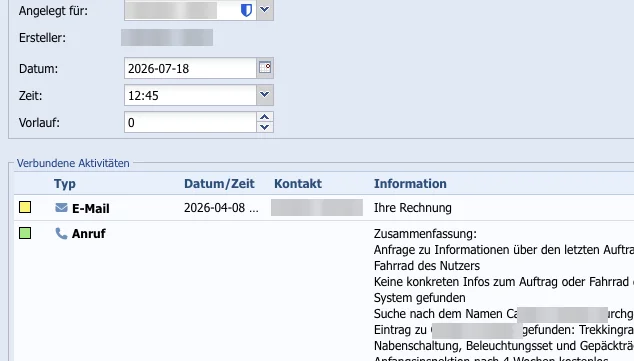
- We have taught the tasks module a fundamental extension. You can now link several pieces of information into one task and, the other way round, also see when a task was created from a call, for example. So I can see when several tasks were made from one call.
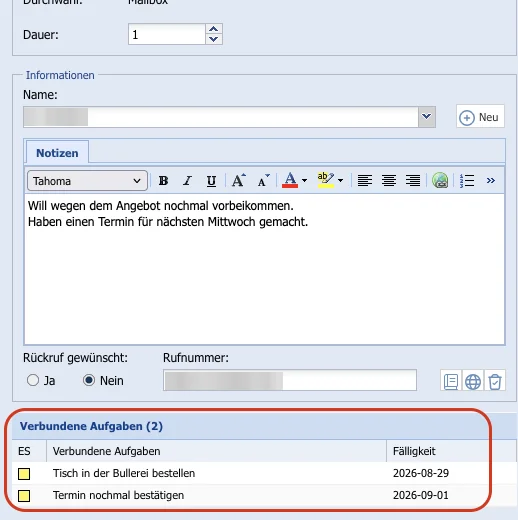
And this is how I see when several activities have been added to a task.
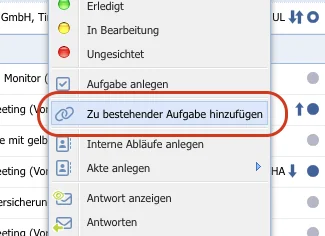
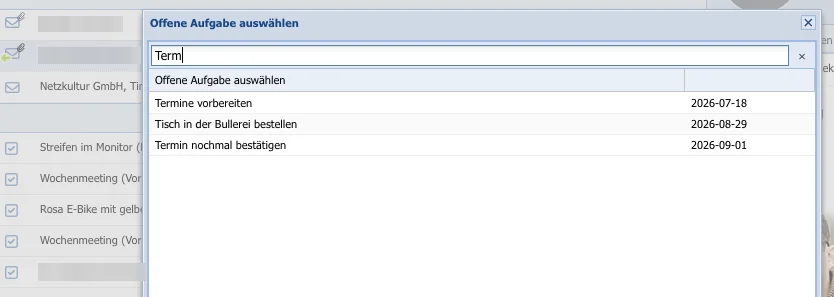
Using the right-click menu, I can also add an activity to one of my open tasks afterwards.
Records
- After an update, the geo service that turns addresses into coordinates for the geo map had problems with umlauts in addresses. It works again. Greetings to München too.
Calls
- AI call summaries with NETZkultur cloud telephony. The function is now being rolled out gradually so that we can keep optimising the AI prompts. With this update, together with a Starface module, the technical basis is now available for everyone. After a call, a summary of the call is shown to you in a separate tab of the call. Each infra-struktur can use its own AI provider and its own prompts.
Feel free to talk to us about it.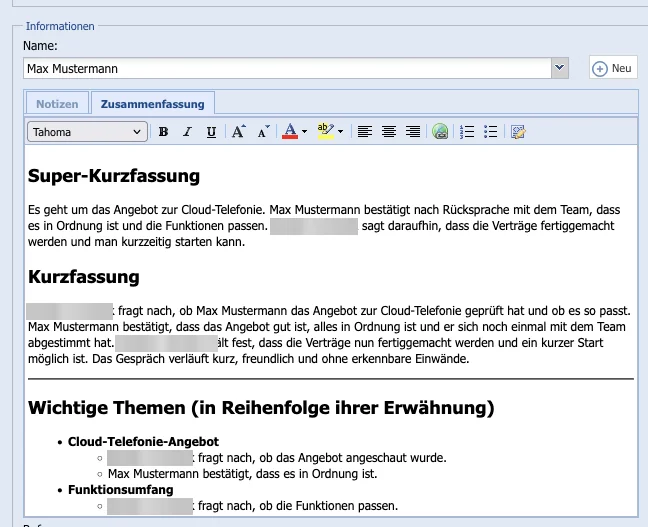
- New infra-struktur Connect module for NETZkultur cloud telephony. The new module for connecting Starface telephony with infra-struktur now also recognises who answered a call and enters this. The duration of the call is also stored.
- In the call list you can also play audio files, for example ones added there by answering machines. Recently the player refused to work. It works again now.
- A piece of information that is also important for the admin, but that you infra-struktur users will probably notice first: Sipgate is gradually switching its accounts to a new concept, “Sipgate Neo”. Once you have been switched over, the dialling function will at first stop working. Then something just needs to be changed in the administration. Let your admin know (often that is us, too).
E-mails
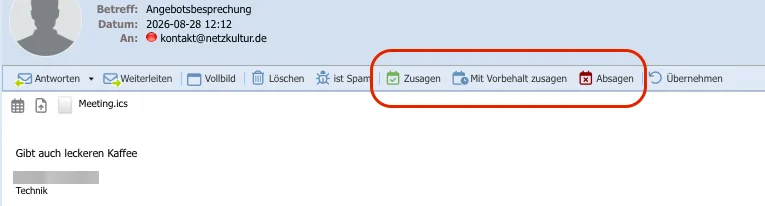
- Meeting invitations can now be accepted, declined and answered with maybe directly in infra-struktur.
- In the red/yellow tab (in progress), you were not shown that a mail had already been forwarded. Works again.
- Transferring a mail attachment directly to document management works again.
- Until now, Microsoft365 mailboxes could not be used in the notification centre. We have now programmed them in there too.
Kanban board
- The Kanban board can now also be used fully on mobile devices. This means that, for example, people in production can work with the planned workflow on a tablet.
Signature manager
- Actually something for administrators, but since many infra-struktur users also maintain their own signatures, I will describe it in this section. From now on, it is possible to maintain a central signature and insert individual values for each colleague dynamically using placeholders.
This ensures that the central signature always looks the same for everyone, yet each person still gets their individual information. The central signature with placeholders can then look like this, for example: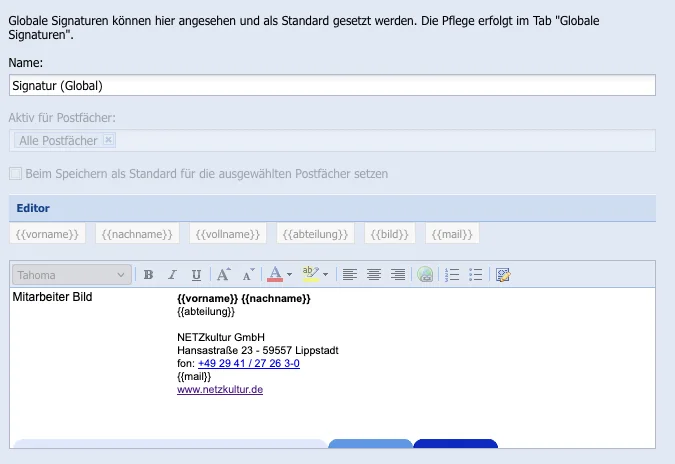
Here you can define your very own placeholders, which can then be filled with values for each user: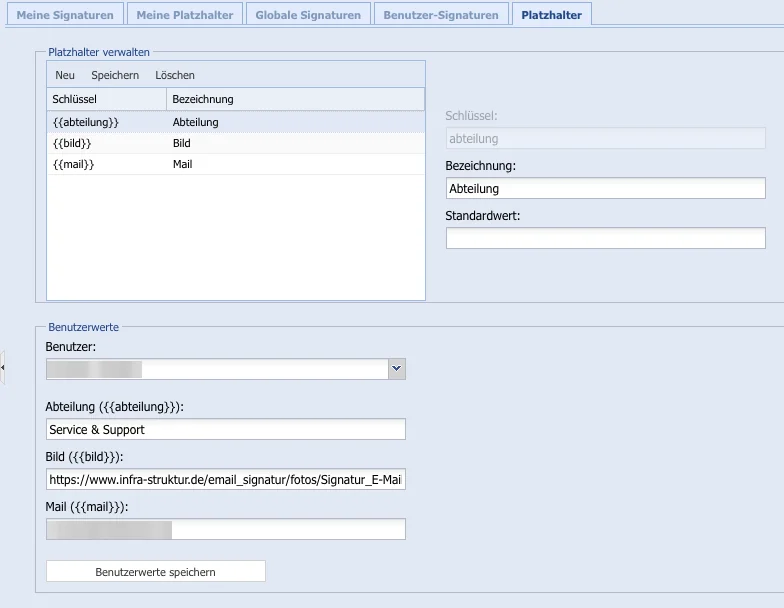
For administrators
Of course, the administrators also get a few new functions and bug fixes. The administration for the AI summary, for example, should be exciting.
Calls
- Under Administration -> Calls there is already the area where the AI summary is connected to an AI system and where the prompt is created and tested. Detailed information on this will follow at a later stage.
- New dialling aid for sipgate Neo. Sipgate is gradually switching all accounts to Sipgate Neo. This means the dialling aid must then also be switched to Sipgate Neo in the administration.
Web services/interfaces
- The getUserAbbreviationById function returned an error when there were umlauts in the user abbreviation. This has been fixed.
- Until now, the SearchIDOByInstanceIDAndCombofieldIDByValueID function also returned deleted records. These are no longer included.