
For users
We are putting our big update into the non-existent summer lull once again.
Many things here are preparation for something big that is expected to come out this year.
But of course we have also worked on your wishes and the little quirks you reported.
Here are the details:
General
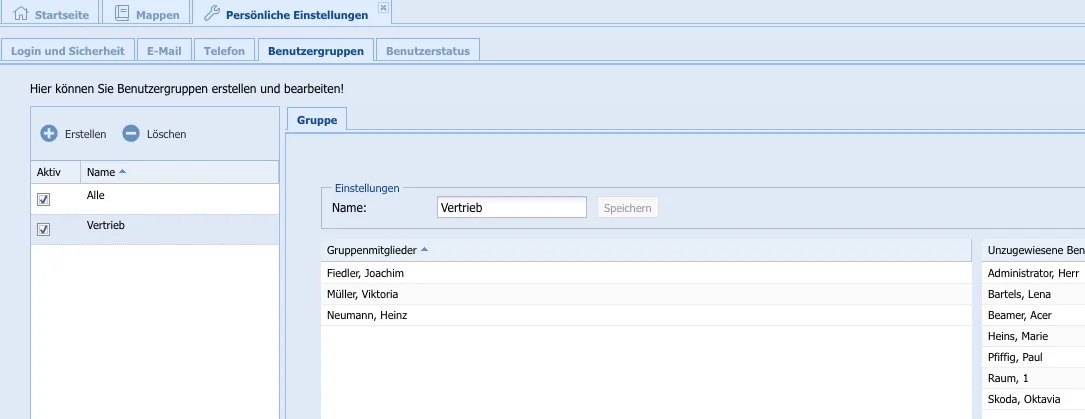
- The management of virtual groups has been completely rewritten. This also means that all groups are visible to new colleagues right from the start.
- to log in to the infraUpload app, you use a QR code that is shown in your personal settings. Under certain circumstances, it was not completely within the visible area.
- in the online list, cancelled appointments are no longer shown in the user’s status.
- The time recording had stopped logging status changes. Everything ends up there again now
- There is a new version of the infraMailer that works around a bug in Windows 11. If you have this problem, feel free to contact our support team.
Call list
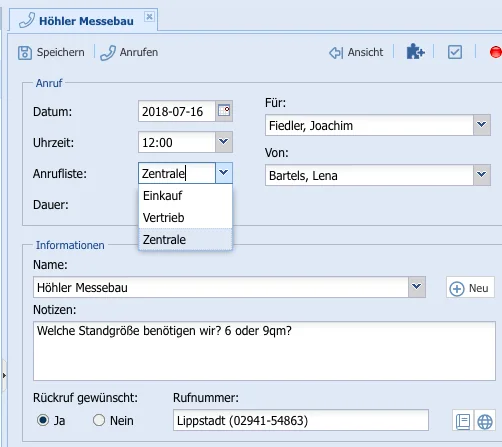
- Until now, it was not possible to assign a call to a user who does not work with the same call list and perhaps sits in another branch or department. We have now made this a little more flexible. I can always assign a call to any user. (Because of the change, older calls that have already been dealt with may reappear in individual cases.)
Tasks
- Tasks from e-mails, calls, documents and so on used to take over the date of the information. That makes no sense, so from now on today’s date is always used.
Notification
- There is now also the e-mail input channel. Until now, it only existed for delegated e-mails. Now you can set up a notification for any e-mail. Perhaps with a time window, when you are urgently waiting for something. Our tip: be careful with notifications like this. Constant alerts about new e-mails can also be very disruptive and cost a lot of time.
- In addition, there is also the new output channel with “E-Mail Vorlage” (e-mail template). This lets you reply automatically to an incoming e-mail with a template. Bam, done… autoresponder! We have made sure that you cannot send such a reply to yourself.
Document management
- The search for documents has been improved once again.
- A completely unnecessary error message when deleting documents no longer appears, because there never was an error.
E-mails
- E-mails that were retrieved directly into the recycle bin but still came through because of their puzzle link were then not published. That works again now.
- The display of e-mails has been improved once again for certain cases.
- In the search, a slash in the subject meant that the e-mail was not found. This has been fixed.
- The Office365 connection has been optimised once again in many places.
Digital records / IDO
- Record notes can now also contain longer texts or even pasted images. This did not work before.