
For users
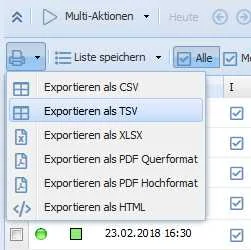
Today another update is due, with many new functions and improvements. An exciting one is the option in the new modules, which we are currently activating step by step, to export activity lists in all areas to a wide range of formats (csv, tsv, xlsx, pdf, html). Many will find this very useful for the duty to provide information under the new EU GDPR, but also for plenty of other processes. The new calendar has also received a few exciting new features, and the “small” infra-struktur (mobile /m) now also asks for two-factor authentication.
And now here are the details!!
General
- Export option in the new modules. Here you can export the visible header data as lists to the formats csv, tsc, xlsx, pdf and html and then, for example, print them. But remember the trees!!!
- in the mobile /m, the second factor is now also requested when two-factor authentication is activated. Better safe than sorry!!
- Under certain conditions, the delegate window could no longer be closed. Always works now.
- The dialling function with a so-called URL call now closes the small window on its own.
Mail centre
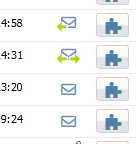
- on the home page and in the new modules you can now also see whether an e-mail has been forwarded with infra-struktur.
- Anyone who wanted to create templates using attachments with umlauts in the file name had a problem. Not any more!
- Certain PDFs could not be displayed because the sender’s app had declared them incorrectly. We are working around this and making them work.
- Pasting e-mail addresses into the editor now also works when they are separated only by spaces.
Calendar
- Appointment types in the new calendar can now also be edited afterwards. You will be asked whether you want to overwrite the existing values or only change the colour.
- Do you know the many new views in the new calendar? Flexible week, rolling week and so on. Now you can simply switch off the views you don’t use at all.
- Anyone who also uses the calendar for holidays, school days and so on has a real problem on bridge days. So that the untimed area does not push the whole calendar down, you can now adjust your display. Define for yourself how much space untimed appointments may take up before a scroll bar appears.
- And when it’s a full day again, click the date of a day at the top of the week view to jump straight to the day view.
- We have optimised the display of informative versus active appointments a little more.
- Until now, you had to check for conflicts manually while entering the appointment. The check now always runs when saving and warns you if necessary.
- With a print function, you can now open any view currently open in the new calendar as a print-ready PDF. But once again… remember the trees when printing.
- ics files can once again be exported as files in the new calendar too.
- generating the iCal URL did not restrict it to informative appointments. It works again now. If needed, simply generate a new address quickly for the subscription on your phone.
- in the participant list you can now also click the individual column headers to select the whole column. Setting an alarm for everyone with one click… works now!!
- Have you tried simply clicking “Suche” (search) in the new calendar? Straight away you are in the list of appointments for your day and from there you can use your calendar just as you are used to with e-mails, calls and so on. Link them by drag and drop or file them in binders. Or save your search as a list in the organisation menu.
- With the iCal subscription you can now also export individual appointment types only. Why? Because we can… and because it can come in handy. For example, you can transfer only your appointments with the appointment type “privat” (private) to your phone, or you can provide an external contact with a dynamic, very specific list of appointments.
- Sending appointments still had a bug, which we have fixed.
Call list
- creating tasks from a call without a reason entered… let’s say… that went wrong! But it works again now.
- the red/yellow tab now also shows unprocessed calls.
Tasks
- a date format changed for the whole of infra-struktur could lead to errors when creating tasks.
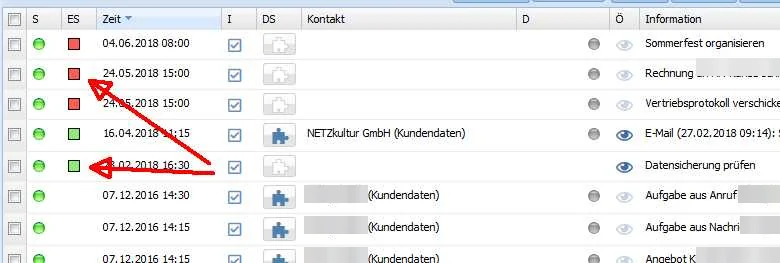
- So that you can see straight away how far the person handling a delegated task has got, we have introduced the square status as an “externer Status” (external status). This way you can see at a glance what is still open with your colleagues.
Data records (IDO)
- There could be problems with dialling out if field names contained an umlaut or a certain phone number format was used. Both work now.