
For users
Today’s update once again brings many small improvements and bug fixes. There is also plenty for users who are already testing the new modules.
Home page (new version)
- when creating appointments via the shortcut in the menu or the “+” at the top right, you could create appointments perfectly well but unfortunately not save them. That works now.
Mail centre
- when writing e-mails, it was possible to enter just a name as the e-mail address instead of a valid e-mail address. We now check this more closely so that you really do use e-mail addresses.
- the processing of incorrectly formatted e-mails has been improved once again.
- e-mails with a very large number of recipients made the header so big that, try as we might, it no longer fitted on the screen. We have come up with something for that.
- winmail.dat attachments you receive from now on can also be opened directly. So you no longer need an extra program for them.
Calls
- When you move the mouse over a caller’s name, the phone number is shown to you again.
Documents
- you could no longer categorise documents if a certain field in the data record was empty (the display field on the home page). A strange effect, but it’s gone now.
The new modules
- in the calendar you can now set the time interval and a zoom factor. If you could not fit your whole working day on one screen before, you can now adjust the view more precisely. You will find this in the settings of the new calendar.
- a problem with appointments that extended past the 00:00 day boundary has been fixed.
- e-mails you had scheduled to “später senden” (send later) can now also be deleted before they are sent. Until now there was no going back.
- if you searched for e-mails via the workspace search at the top left without a search term, simply by pressing Enter, the system tried to show all the e-mails you have access to. This could make the system very slow for all your colleagues for several minutes. We now keep a better eye on this for you.
- do you miss the little magnifying glass from the classic mail centre? Try right-clicking on an e-mail or a call.
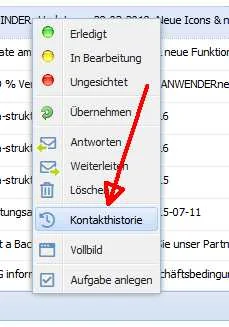 One click and the search starts in a flash.
- Who do you actually want to write to when you reply to an outgoing e-mail? Yourself? Hardly! So we have set logic aside for once and enter the recipient of the outgoing e-mail as the recipient.
- The mail search now finds number combinations in e-mails again without **. So you can search for quotation numbers and the like again.
- quotation marks in the appointment title had slashes in front of them after saving. Doesn’t happen any more.
- In the new calendar, calendar weeks are now also shown in the month view.
- faxes can now also be deleted in the new modules.
- the superuser right (being able to edit all appointments of a colleague) is now also taken into account when you move appointments by drag and drop.
- several small bugs in the new calendar have been fixed.
- Appointments can now also be cancelled.
- In the calendar search, you can also delete appointments by right-clicking.
- We now warn you if you want to enter a recurring appointment with more than 50 recurrences. This is to protect you from input errors.
- the display of appointments in the month view has been improved once again.