
For users
Even in high-summer temperatures, there are of course more updates.
Besides the usual small bug fixes and new features, the entire graphical interface has been updated to the latest version. You don’t notice a thing? That’s exactly how it should be. Visually, everything stays the same, but performance, security and stability are improved.
We have also beefed up the export options in the record lists once again.
General
- Do you easily get muddled about which module you are in? Simply choose your own colour for the mail centre and co. TIP: choose very light colours and not too many, otherwise it will end up looking like a packet of Smarties.
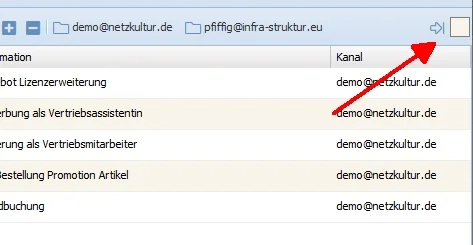
- In the time recording, which stores all login and logout times, a number of things have been fixed and optimised. Given recent legal developments, this could also be of interest to you for recording the working hours of your infra-struktur users.
- A bug when saving the personal settings has been fixed.
- So that we can look after you even better in future, we are gradually replacing the good old support module, and you are getting a new support form. This lets us respond even faster, because we turn your report into an e-mail, and you can find your tickets at any time in the NETZkultur data record.
- Further input channels have been added to the notification system.
Record list
- You can now also export master data merged with the contact persons.
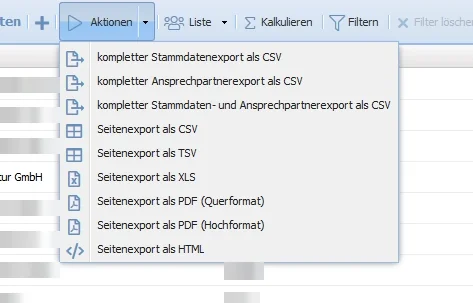
- Also new is the option to export exactly the view currently selected to various formats such as pdf, xlsx and more.
- The new record list is now officially available to all customers. With it, we say goodbye to the classic list and enjoy the many new options and speeds.
- Sometimes permissions on records that were set via tasks did not take effect immediately. This now happens “stante pede”.
Digital records
- Certain configurations caused fields to be given a mail symbol by mistake. Now everything is as it should be again.
Call list
- When you hover over it with the mouse (mouseover), the call list now also shows the full content of the reason.
Calendar
- To avoid mass recurrences being created by mistake, we have built in a limit here and also improved the speed of creating them.
- The location is now also shown when you hover over it with the mouse (mouseover).
- On the home page, untimed appointments are now also shown with the note “zeitunabhängig” (untimed).
- Appointments that go past midnight were not shown in certain views. That has now been fixed too.
- There was a request to adjust the flex week for printing 2–5 days of the calendar, so that fewer than 7 days can be set. We can’t fulfil every wish, but this one was doable.
- Monthly recurrences on a particular weekday can be entered correctly again.
- All-day appointments are now also taken into account when calculating conflicts.
Documents
- Categories with umlauts can be created again without any problems.
- If you upload a document with the + in a digital record, it is now also linked straight away.
Messages
- You can no longer send empty messages by mistake. We have built in a warning for that.
- The print view now also shows the date and time of the message.
- When you create a task from a message at the end of a conversation, the last message is now also included in the task.
- If you replied to someone and then straight afterwards sent another reply to the same message, it went to yourself. Who wants that? So it’s gone.
For administrators
- So that you can see all the options for automatic visibility at a glance, we have extended the information on the mode in which e-mails are made visible automatically. You can see straight away whether all, no or only linked e-mails are made visible in a mailbox.
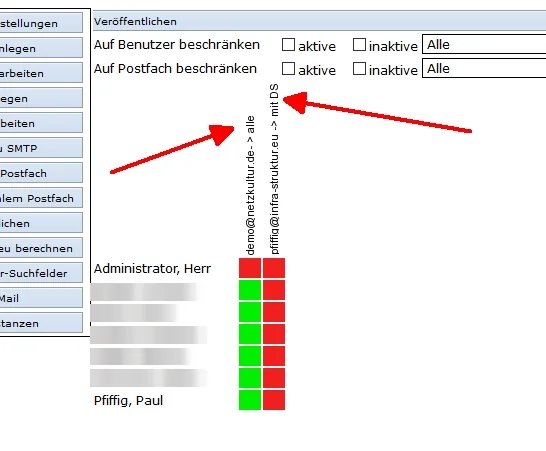
- “Veröffentlichen neu berechnen” (recalculate publishing), i.e. re-archiving, of e-mails has been sped up massively once again. As an administrator, please make sure to run it outside peak usage times if possible, as the recalculation can slow the system down for a short time.
Documents
- Here too, we have sped up “Veröffentlichen neu berechnen” (recalculate publishing), i.e. re-archiving, massively.