
For users
Maintenance update (26/09/2018)
This small update improves performance and fixes minor bugs.
Summer break? Not for us…
Today’s update once again brings an incredible amount that is new. Besides the complete history and the new multi-day view, a lot of performance optimisation has gone in. We were able to give the call list, the notes and the calendar more power once again. On top of that there are lots and lots of smaller new features and bug fixes. Quickly move a task into the future with a right-click, and much more.
And for the beta testers of the new DIGITAL RECORDS, there is now copying of records in all variants and the option to adjust the forms in even finer detail and add functions to them.
Here are the details:
General
- all modules now also have their own + button for creating a new item of information. Of course, as before, you can always use the big + button in the top bar from anywhere.
- If you didn’t have it yet, you now have our help menu. There you will find videos, the user wiki, remote support and step-by-step instructions on all topics. Be SURE to take a look. You are bound to find functions there that you didn’t know about yet.
- To get to your ideal selection faster, you can now activate or deactivate all mailboxes, filing locations and so on with small plus and minus buttons. Tip: save the ideal view straight away as your default list!!
- Because we use different graphical interfaces, the iPad sometimes could not cope. We have given it a helping hand here and handle certain gestures on mobile devices differently from the full version. (E.g. tapping the puzzle button always opens the data record list with search. A long tap opens the right-click menu. As soon as you use the new digital records, this applies consistently everywhere.
- Multi-publish. Sounds odd, but it lets you select many e-mails and publish them via the right-click menu.
- Sometimes certain things could no longer be clicked if you had hidden columns. Everything works properly again.
- The icons used in many places in infra-struktur come from “font awesome”. There has been an update with lots of new icons. Maybe there’s something for your menu?
Mail centre
- The recycle bin can now be reached directly from the mail centre and always shows how many e-mails are in it.
- In the recycle bin you can now also see at a glance whether an e-mail ended up there as spam or was deleted. This makes checking easier.
- The advanced search has been improved once again and gives better results.
- Manually created spam rules now also work properly with umlauts in the subject.
- Embedded images were sometimes not shown in outgoing e-mails. Fixed!! You can now also allow images in outgoing e-mails. Of course, if you always save your recipients properly as contacts, you won’t need this.
- Faulty winmail.dat files could not be recognised, but they are now offered for download in any case.
- If you changed the recipient when delegating an item of information, the text was not visible to them. This has been fixed.
- Showing a reply from the right-click menu now also works within the mail centre.
- You can now send e-mails to recipients with umlaut domains again.
Call list
- In a certain configuration, individual calls were only shown on the home page but not in the module itself. Everything’s back!!
- Faxes that consist of several files can now also be displayed in the new modules.
Calendar
- With the new multi-day view you can once again show all the appointments of a day for the colleagues you have selected side by side, as in the classic calendar. With very full calendars, this can be clearer than the actual multi-view.
- The calendar can now also be opened several times by right-clicking its icon.
- A few minor problems with printing/exporting the current calendar view have been fixed.
- In the month view, too, you now see the details when you move the mouse over an appointment title.
- If you like to use the plus button at the top left to create appointments, you will now be offered the date your calendar is currently showing. Makes sense, doesn’t it.
Tasks
- When you created weekly recurring tasks on several weekdays, they were not created the way you probably wanted. Now it works the way you planned.
- With the right-click menu, you can now move tasks on by a day or a week with one click.
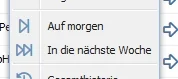 But careful, this doesn’t get the tasks done… you still have to do that yourself 😉
Document management
- A problem with umlauts in the document title has been fixed.
- You know the ID of the document you are looking for? Then simply search for it. That works now. If you get too many results, just use “id:12345” and only the ID will be searched, not titles or tags.
Notifications
- A few input channels for calendars were not yet working correctly. That is sorted now.
- For newly created users, the alarm was deactivated at first. We have turned that round.
Notes
- The list and the search in notes have been sped up.
- Creating tasks from notes works again.
New digital records (beta version)
- When dialling out, the name is now set everywhere and umlauts are also displayed correctly.
- More columns can now be sorted in the history.
- Sometimes the history was only shown if tasks were deactivated. Bug found and fixed!
- messages to several recipients could also affect the history. But that is sorted too.
For administrators
IDO administration
- for the new IDO/data records, you can now activate multiple types and functions using control characters in the field names. For example, the character string “|d” turns the field into a date field. You will find the functions available here described in the admin wiki.