
For users
Bug fix (09.02.2016)
– For e-mails that are not linked and whose images were therefore hidden, the links could no longer be used either. This update fixes the problem.
General
– Various performance and security updates
– If you can select your name when logging in, you may have had difficulty finding yourself since the last update. The sorting is alphabetical again, as it should be.
Document management
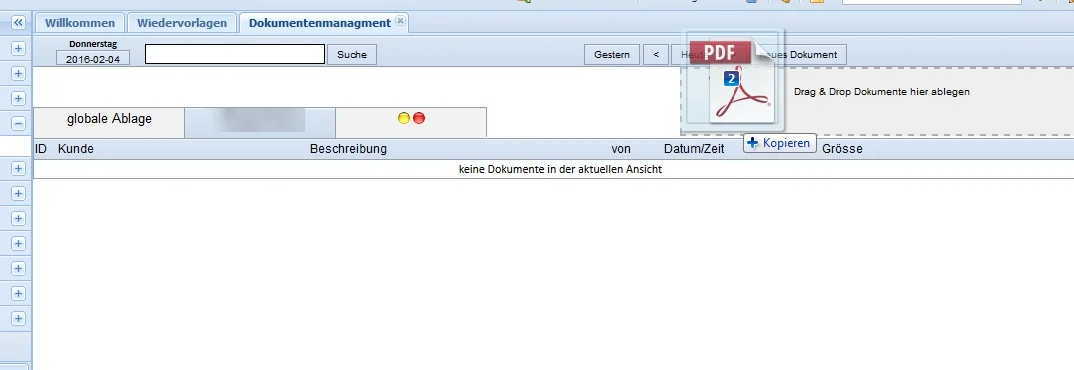
– As with e-mails, you can now also drag files directly from a folder into a special area in document management to upload them quickly and easily.
Mail centre
– For e-mails without a record link, graphics are not loaded straight away when the mail is opened, but only after you have confirmed this at the press of a button. This increases security with spam e-mails or aggressive advertising. Nothing changes for you with e-mails from your known contacts.
– Until now, you could only use the “allen Antworten” (Reply all) function in the mail centre. You will now also find it in the extended menu of every e-mail.
– Forwarded e-mails can now be saved as drafts again too.
– To be used with caution, but useful in certain circumstances: have your administrator set things up so that an e-mail you delete on your mobile phone also ends up in the bin in infra-struktur, even if it is linked to a record
– When searching for e-mails, full stops or hyphens in the search term meant that you could search but found nothing. This has now been fixed.
– The spam filter now leaves mails linked to records where they belong. In the record.
– If an e-mail could not be sent and therefore remained in your outbox with red status, you can now once again view the detailed error report from your mail server by clicking the status.
– Error handling when sending mail has been stabilised and improved overall.
– Under certain circumstances, not everything was packed when attachments were downloaded together as a zip file. This works again.
– For e-mails opened in full screen directly from the welcome page, the year 1970 was sometimes shown as the date. There were no e-mails yet in 1970, so the actual date is now always shown here.
– Under very complicated circumstances, clicking the status of an e-mail might not show the next logical colour but a text with numbers. The matching colour status now appears here again.
/mobile
– When downloading a versioned document, the most recent version is now downloaded.
– In the “normal” version, you could not see that an e-mail had already been answered via the mobile version. The matching icon now appears here.
For administrators
Web services
– To use web services within infra-struktur via an individual tab as well, you can now also authenticate with the md5 hash supported by tab management.
E-mails
– In the folder mappings of the IMAP mailboxes, you can now also activate the option that deletions on other devices take effect in infra-struktur, even if an e-mail is linked to a record. This function should be used with care to avoid unwanted data loss.