
For users
A note on our own behalf: in our blog it was recently hinted that our release notes sometimes lack the necessary seriousness. So from now on we will write everything in deadly earnest…..well, a bit more seriously…..a little…..
New function: read in addresses automatically.
You often create new records by copying address data from a legal notice or a signature. With a text field, you can now turn this directly into a record automatically.
Just a few clicks to configure, and off you go!
- Select your address databases.
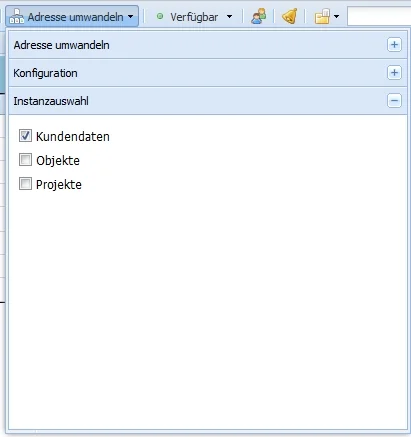
2. Set the field types for them.
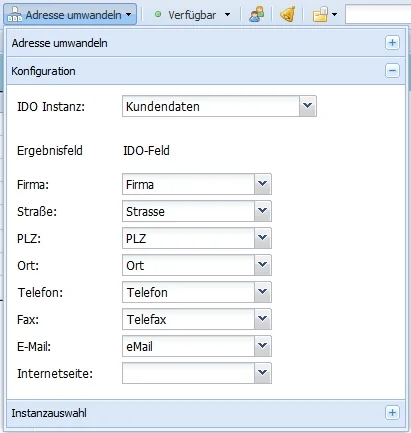
3. Simply copy in the address and click “umwandeln” (convert).
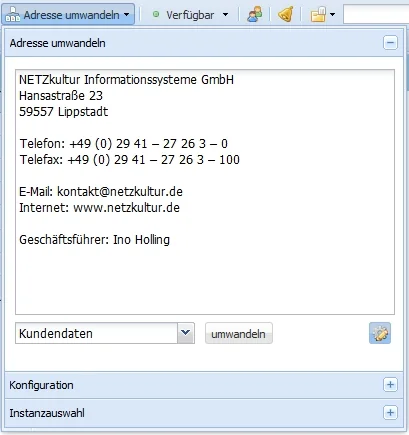
The new record then opens. If necessary, you can still rework the recognised fields here.
You will find details in the user wiki.
General
– Goodbye “classic” notes. After several years of running the “old” and the new notes in parallel, the old module is no longer in use from today. This makes room for developing other modules further.
If you were still using the old module and need it again, just contact our support or the partner company that looks after you.
IDO/records
– There is even more space for the titles of tasks and activities. More space = more info.
Mail centre
– After we brought you a new version of the editor in the last update, this time we have added a few more functions to the toolbar.
– Oh yes, and the signature editor now looks exactly the same!!
– Deleted mails are now no longer shown to other users with archive rights either. Who would want that anyway?
– Images in .tiff format cannot be displayed in the browser. What doesn’t fit is made to fit. We now convert them automatically into .png format.
– Sometimes embedded images were no longer shown after forwarding. This has been fixed.
– If you switched between different templates or drafts, the attachments and recipients added up. Makes no sense, it’s gone.
Document management
– Umlauts once again. When you edit the document title, äöü stay äöü and do not turn into ÀöÌ or similar.
– The drag & drop function has been adjusted a little once more.
infraSync (beta version. Not yet available in all installations)
(After the update, a problem with Android devices was found. We fixed it on 05.10. It may be necessary to regenerate the appointments by clicking in the infraSync settings)
– Reminders are now transferred.
– Descriptions are now also transferred.
– A contact instance that has been set up can also be deactivated again.
– The options “ganztägig” (all-day) and “ohne Zeit” (without time) are now also transferred to your mobile device in exactly the same way.
– When matching contact persons to records, values were sometimes not transferred. This now works much better.
– Appointments from the year 1970 are now ignored. Don’t look back, look ahead!! Besides, this avoids a lot of incorrect entries in the calendar.
For administrators
General
– The classic notes module is deactivated from today. In the first step, only the access was removed. If you or one of your customers needs access to the module again, you can grant it via rights management.
If work was mistakenly done in both modules at the same time, please contact our support. We can then convert the existing notes into the new module once more.
IDO
– The IDO notification now also passes the user ID. This means user-related actions can also be carried out after clicking save.
Web services
– Entering values with the setContactDate function only worked for records that had already been saved manually once.
– Umlauts cause problems every now and then. Not any more in the getDocument function.
– The createNewMessage function did create the message, but unfortunately with yellow instead of red status. That is right again.
Call list
– With the cloud telephony provider sipgate, you can now also dial from infra-struktur.