Office eye syndrome – hard work in front of the screen
Office eye syndrome – when your eyes are glued to the screen at work! Relaxing & protecting your eyes in front of the monitor is harder than ever.

Many parents were wrong: our eyes did not turn square from watching too much TV and working at screens, but they still suffer.
According to expert estimates, “office eye syndrome” affects 4 out of 5 people who spend several hours a day working at a screen, and it can lead to impaired vision.
What is office eye syndrome?
Office eye syndrome refers to various eye complaints that occur when working at screens.
Symptoms include:
– burning, itching, red or watery eyes
– headaches
– tired eyes or general tiredness
The symptoms occur because, on the one hand, the eye blinks too rarely during screen work (the eye dries out); on the other hand, screen settings and various environmental factors also play an important role.
So here are 7 tips on how you can counteract office eye syndrome and give your most important sense organ more rest and relaxation again.
1. Set up your screen to be easy on the eyes
Eye strain often starts with the monitor settings. For example, a high contrast is good for the eyes, and you should prefer dark text on light backgrounds. Garish contrasts and settings are best avoided. If possible, nothing should be reflected in the monitor either. With old CRT monitors you should set the refresh rate as high as possible or, best of all, buy a new screen to protect your eyes from the start. You should also adjust the screen resolution to your own individual needs.
2. Breaks
Your eyes really need breaks from screen work to relax, just like the rest of your body. So lean back, have a good stretch, look out of the window into the distance or get up and walk a few steps during your next phone call. A short walk or a nap during your lunch break are of course also great sources of energy for eyes, body and mind. If you want to give your eyes enough rest, you should take a 5-minute break every hour if possible and let your gaze wander away from the monitor.
3. Relaxation exercises for the eyes
With acute complaints, eye exercises sometimes help. Here are a few exercises for you that should help you relax.
Eye rolling
In this exercise you close your eyes and, with your eyes closed, let your gaze rotate – up, down, right, left, just let it circle. A few seconds quickly relax the eye muscles, and the closed lids moisten the eyeballs sufficiently again.
Warmth
Placing a heat pad on your eyes is incredibly relaxing. But you can also simply rub your palms together for a few seconds and then place them over your closed eyes to achieve a similar effect.
Close your eyes
Closing your eyes for a few minutes (e.g. during a meditation) can relieve many office eye symptoms. Simply lean back and relax for a few short minutes. This also lets your mind recover from the hard work at the monitor.
Massage
A little massage, in which you place the thumb and index finger of one hand on the bridge of your nose and gently move them in circles, can work wonders. Massaging your temples also helps enormously.
Accommodation exercise
This exercise is about relaxing one eye while the other has to focus and concentrate.
Here’s how:
Your right hand covers your right eye. Your left hand is stretched out and both eyes try to focus on the palm of your left hand. Then slowly bring your left palm towards your left eye until it also covers the eye completely. All the while, try to keep your focus on the palm. Then do the same on the other side. This really trains your eye muscles, so that you can protect them better in everyday life in future. After all, what is better trained can also do more!
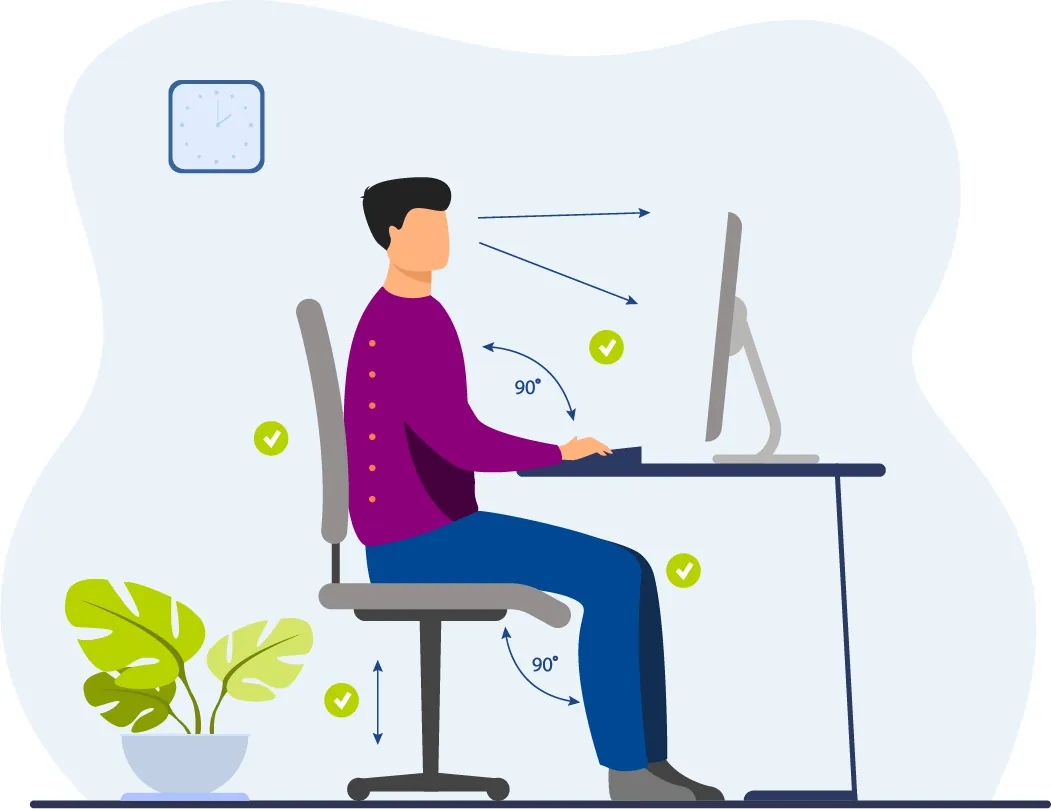
4. Ergonomic screen work
Sometimes we simply don’t give our eyes the best basic conditions. Anyone who doesn’t work ergonomically will unfortunately be caught out by office eye syndrome sooner than someone who values posture and ergonomics.
Does your gaze go straight ahead to the middle of your screen? Then you are already not working ergonomically. When you look straight ahead, your gaze should go just above the top edge of your monitor.
Do you have good posture at work? Posture trainers are no longer expensive these days and help you to maintain the right posture permanently.
© SurfupVector – Adobe Stock
5. Adapt your surroundings
Is the sun reflected in your screen? Not good! Perhaps you can position your PC or your desk differently. The best place would be parallel to the window, so that you neither look out of the window nor have the window behind you. That way you can also glance sideways out of the window more often while working and give your sense organ a short break from screen work.
Don’t forget to air the room regularly, either. Especially in winter the air dries out far too quickly, so you should air the room every hour. That is good for your eyeballs too.
6. Eye drops
If you just can’t get office eye syndrome under control, eye drops from the pharmacy can also help. They are very similar to tear fluid and moisten your eye, which could protect your eyeballs and relieve your symptoms.
7. Eye doctor
But if nothing helps, it’s time to see a doctor. Perhaps you need glasses?
Incidentally, if office eye syndrome goes unrecognised or untreated for too long, it really can damage your eyesight. So: keep your eyes open and take care of your most important sense organ!