Maximum mobility when working from home
With central solutions, you not only stay able to work when working from home, but can work just as if you were in the office.

Able to work at any time – even from home
Receiving and dealing with e-mails when working from home is no problem at all. Beyond that, however, what many believed to be a “digital workplace” reveals certain weak points. These include the “classics”:
Phones and phone systems that work wonderfully in the company, but when working from home you have to make do with your private smartphone.
Files and documents that are stored centrally in the company, but only there. Quickly pulling up Ms Meier’s current quote or accessing project documents to prepare for the next appointment becomes difficult.
Local programs such as bookkeeping, accounting, ERP, inventory management systems etc. on your servers or on PCs that cannot be used from outside “just like that”.
Far too many “isolated solutions” are in use, which become all the more noticeable when working from home. Daily organisation gets out of hand and before you know it, the day is already over. In a way, you lock yourself out, and that really does not have to happen.
Your goal should be:
“I want to work from anywhere as if I were in the office.”
Solutions for working from home
1. Phone & phone systems
Telephony in particular should no longer be tied to your office workstation these days under any circumstances – it can be done much more mobile and flexibly, from home or anywhere else.

An example? Gladly
I regularly work from home and of course have to be reachable by phone for everyone, using the familiar business number.
But I also make outgoing calls with this very number – my private mobile number has no business appearing on the display of prospects, customers or business partners.How? Quite simply: a phone is installed on my notebook, a so-called “softphone”, and an app runs on my smartphone. That really is all there is to it.
More information on NETZkultur CloudTelefonie is available here (opens in a new tab)
2. Files and documents
When working from home, you no longer face the challenges “What is stored where and, above all, how?” or “How can I share the information with colleagues and customers?” The question is how you get to the files and documents you need right now at all (and, of course, as easily as possible). What you need is a central and uniform structure that helps you keep track and can be reached securely via the internet.

As a graphic designer, I need access to all important data and documents even when working from home. With my central data management, I have access to logos, images and documents from anywhere in the world.
Katharina Brakk, Marketing
3. Local programs when working from home
Programs that fall into the category of inventory management system, ERP, bookkeeping or accounting usually involve sensitive information and data. So, in addition to mobility when working from home, it is absolutely necessary to do everything for data security and to ensure appropriate data protection.
How do you achieve that?
You should get rid of countless unnecessary data sources and end devices and store the data centrally. That way, only the central location has to be secured and not all end devices etc.
A cloud server is the ideal solution for being on the safe side while mobile. Expensive purchase and maintenance costs or over-licensing are also eliminated, because you access your programs via the central cloud server. Administration is of course also easier, because everything is controlled centrally and not on 14 workstations.
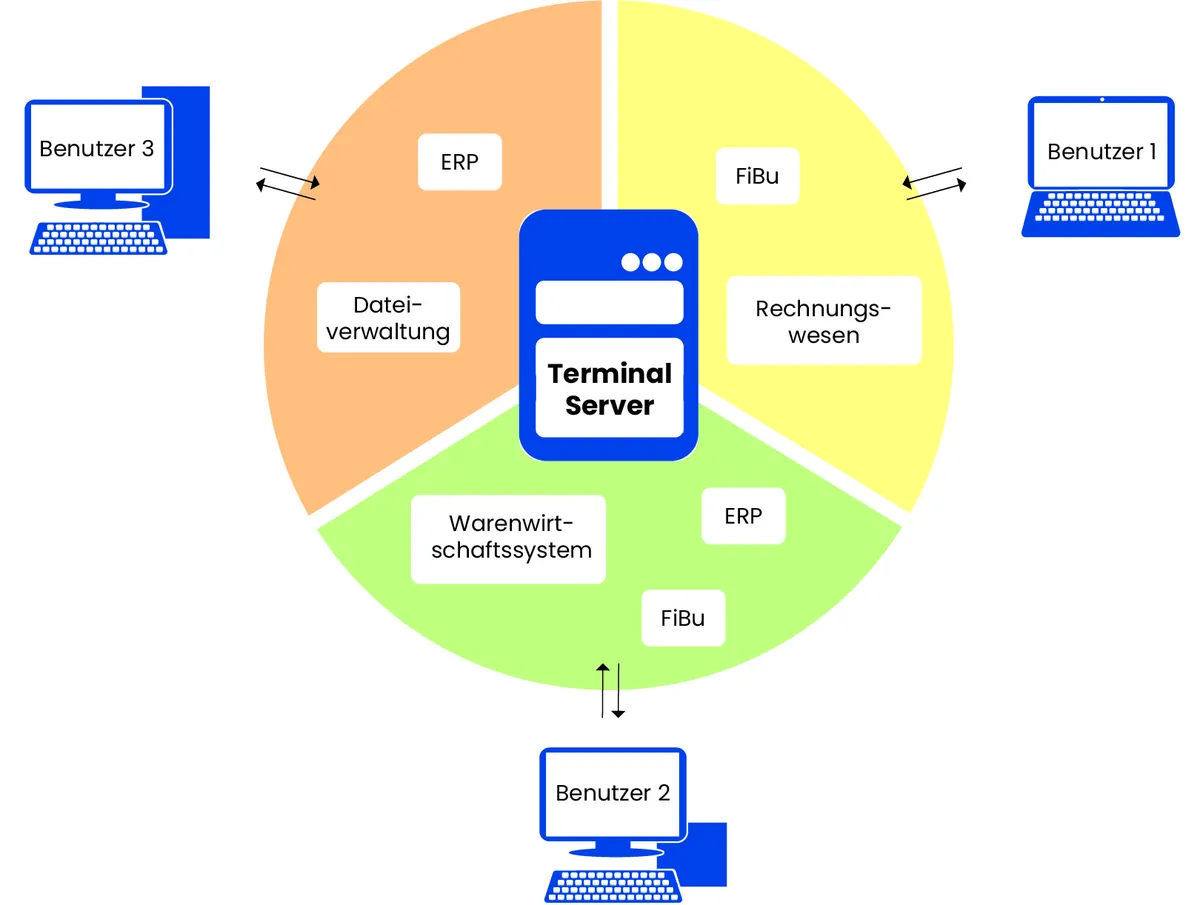
Another plus: you always have your desktop with you! No matter which workstation you log in from – that is not a luxury, but a must! Your desktop is part of your working environment, and that simply has to be right.
Salaries always have to be paid and payslips created, even when I am working from home. By using a cloud server, I also have access to my systems and programs from home.
Dagmar Wolff, Administration
4. Reduce isolated solutions
Instead of using lots of individual solutions that offer even more great and endless functions, you should ask yourself what you actually need. Are the countless functions and options actually used in the end, or do the basic functions already get you where you want to go? With our XRM solution “infra-struktur”, we have created a digital workplace that ensures easy collaboration, communication and better insight across the entire company.
More information here: Your digital workplace explained in 4 steps