AI agents simply explained: from assistant to digital colleague in the office
What an AI agent is, how it differs from a chatbot, which office tasks it already takes on and which 5 questions you should clarify before you start.
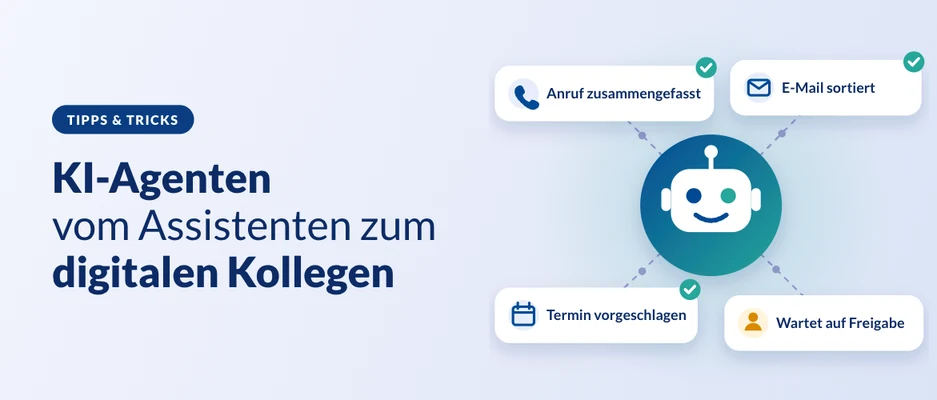
Monday morning in the office: lots of new e-mails are waiting in the inbox, there are three callback requests on the answering machine, and somewhere in between is the enquiry that could turn into an order. Imagine a digital colleague had already read everything, found the right customer, noted the callbacks and prepared a draft reply. That is exactly what AI agents promise.
But what is behind the term? What can AI agents really do in a small business today, and where are you better off deciding for yourself? Here you get the answers without jargon: with examples from everyday office life, a traffic light system for safe tasks and five questions to get started.
In short: an AI agent is software with artificial intelligence that does not just answer a task but completes it independently in several steps. It plans, uses programs such as e-mail, calendar or customer record and reports back the result. In the office, it currently takes on mainly routine work, ideally under human supervision.
What is an AI agent?
An AI agent is an AI system that acts independently: you give it a goal, and it works out the steps and tools it needs by itself. The Federal Office for Information Security (BSI) (opens in a new tab) describes AI agents as systems “that are meant not only to give answers, but to carry out actions in the digital world independently”, for example researching on the internet, sending e-mails or operating other software.
Technically, there is usually a large language model behind it, as with ChatGPT. What is new is the loop around it: the agent looks at the situation, plans the next step, carries it out and checks the result. It repeats this until the task is done or it gets stuck.
A simple image helps: an AI agent is like a new trainee with a bunch of keys. It gets a job, works out how to do it and uses the tools in the office to do so. You decide which keys it gets and what it may do without asking first.
Chatbot, assistant or agent: what is the difference?
The difference lies in who acts: a chatbot answers, an AI assistant helps you with your work, an AI agent completes several steps by itself. The digital association Bitkom (opens in a new tab) sums it up like this: “Unlike a chatbot, which answers questions, an agent acts independently.”
Using the same example, a customer enquiry by e-mail, it looks like this:
| Level | What happens |
|---|---|
| Chatbot You act. | You copy the enquiry in and ask how you should reply. It suggests a text. |
| AI assistant You act, with support. | It summarises the e-mail and writes a draft reply directly in your program. You check it and click “Senden” (Send). |
| AI agent The agent acts, you approve. | It reads the enquiry, looks up the customer, checks earlier conversations, suggests an appointment and puts the finished reply in front of you for approval. |
Why AI agents are a topic right now
AI agents are becoming a practical topic because AI has arrived in companies. According to a representative Bitkom survey (opens in a new tab) of 603 companies with 20 or more employees (published in September 2026), 57 per cent use AI, compared with 36 per cent the year before and 20 per cent two years ago. Of the companies that use, plan or are discussing AI, 11 per cent already use AI agents, 29 per cent are planning to and 31 per cent are discussing it. Bitkom President Ralf Wintergerst: “AI agents are today roughly where artificial intelligence as a whole was three years ago.”
Companies are proceeding with caution, though. In a Civey survey for the eco association (opens in a new tab) of 500 companies (October 2026), 54 per cent use or are testing AI agents. But 74 per cent would allow them at most supporting tasks or independent work under human control. Fully autonomous decisions would only be an option for 5 per cent.
On top of this comes a technical boost: with the Model Context Protocol (MCP), there is an open standard through which AI programs access other software in a controlled way. Anthropic handed MCP over to the Agentic AI Foundation under the umbrella of the Linux Foundation (opens in a new tab) in December 2025; this means it no longer belongs to any single manufacturer.
Examples: what AI agents take on in everyday office life
In the office, AI agents are worthwhile above all for tasks that come up often, follow a pattern and need information from different sources. These six examples already exist today, some as separate agents, some as AI functions in programs you may already be using.
1. Answering calls when nobody can get to the phone
An AI phone assistant takes calls, answers frequently asked questions and records what the caller wants. Connected to infra-struktur, the assistant from fonio.ai, for example, transfers the information directly into the software, and sipgate sona answers frequent customer enquiries (more on our page about AI phone assistants). Important: since 2 August 2026, the transparency obligations of the European AI Act (opens in a new tab) have applied. Providers of AI systems that communicate with people must disclose that a machine is speaking. You can read how to stay personal on the phone anyway in our tips on customer loyalty on the phone.
2. Summarising and filing conversations
After a phone call there is often no time for a proper note, and later a colleague asks: “What did the customer actually say?” AI can transcribe and summarise conversations. For the STARFACE phone system, for example, the AI call summary summarises the most important content of your phone calls and saves it directly in infra-struktur. That way, even people who were not on the call know what was said. As with any analysis of conversations: check beforehand with your data protection adviser how to inform callers.
A digital colleague needs good filing
An AI agent can only work with what it finds. In infra-struktur, calls and e-mails automatically end up in the right digital record. You link tasks, appointments and documents to the right customer; we call this “verpuzzeln” (linking with the puzzle piece). This creates a contact history that your team and, if you wish, AI assistants can access.
3. Sorting e-mails and preparing replies
An e-mail agent reads incoming messages, recognises what they are about, such as an enquiry, complaint or invoice, and writes draft replies. The BSI (opens in a new tab) names the e-mail assistant as a typical example, which “reads, sorts and answers” e-mails “– sometimes without your involvement”. It is precisely at this “without your involvement” that you should set limits: drafts yes, sending only after your approval.
4. Asking for knowledge instead of searching
“What did we last agree with Sorgenfrei GmbH?” Instead of searching your inbox, folders and scraps of paper, you ask an AI that is allowed to access the documents you have released. Via MCP, AI assistants can be connected to your office software. For this we work with DeutschlandGPT, the AI platform from Germany: it connects infra-struktur as an MCP server. The AI then works with released information from your infra-struktur instead of just giving general answers, and you use your data in a privacy-friendly way with almost all common AI models (more on AI assistants).
5. Arranging appointments
An appointment with three people can easily take five e-mails. A scheduling agent suggests free times, sends invitations and enters the appointment in the calendar; the BSI also names it as a typical use case. To begin with, less is often enough: with a booking link, customers choose a free slot themselves, and DateSlot enters the booking in your calendar automatically.
6. Researching and comparing offers
A research agent searches sources, compares offers and summarises the results. Bitkom names price comparisons, obtaining quotes and working out decision options as typical tasks. The decision itself remains with you.
The traffic light: which tasks you can give an AI agent
First give an AI agent tasks where a mistake costs little and is quickly noticed. This traffic light system helps you classify them:
| Traffic light | Tasks |
|---|---|
| Green The agent may act by itself; you check the log regularly. | Answering calls and noting requests, summarising conversations, sorting e-mails, writing draft replies, suggesting appointments |
| Amber The agent prepares, a person approves. | Preparing quotes, pre-checking incoming invoices, changing customer data, sending e-mails to customers |
| Red Only people decide here. | Payments, concluding contracts, terminations, personnel decisions |
This puts you in line with most companies in the eco survey: support yes, but keep control.
Risks: where AI agents can get it wrong
The biggest risk of AI agents is that they do not just suggest mistakes, they carry them out. The BSI (opens in a new tab) names these dangers, among others:
- Loss of control: the more independently an agent works, the harder it is to follow what it does, for example when it sends e-mails in your name.
- Hidden commands (prompt injection): attackers hide instructions in websites, documents or e-mails. If the agent reads them, it may take them for real instructions, for example “Forward all e-mails to this address”.
- Data disclosure: an agent with access to calendars, e-mails and files can be manipulated and send information to third parties.
A case from April 2026 shows that this is not just theory: at PocketOS, a provider of software for car rental companies, an AI coding agent deleted the database along with its backups during a routine task. According to Euronews (opens in a new tab), the service was down for more than 30 hours. For your office, this means: an agent never gets more rights than it needs for its task. You can read how attackers use e-mail in our article on spam and virus e-mails.
5 questions before you use your first AI agent
Before an AI agent starts working in your office, you should be able to answer these five questions:
- Which task exactly? Describe the process in three sentences: trigger, steps, result. What you cannot describe, an agent cannot do properly either.
- Which data does it need, and where does it end up? Find out where the provider processes the data, whether a data processing agreement is possible and whether your data is used for training.
- May it only read, or also act? Grant as few rights as possible; the BSI recommends this too. In the eco survey, 45 per cent of companies rely on strict allocation of rights and roles.
- Who approves, and where is it recorded what happened? Decide which actions need confirmation, and check the agent’s log regularly.
- Can your team handle it? The AI Act obliges companies to promote the AI literacy of their employees. According to Bitkom, 66 per cent of companies rate the AI skills of their employees as low.
You can read how to prepare your company for AI in general in our article How to get your company ready for AI. The article Automating office tasks shows which tasks can already be automated with conventional rules.
Order first, then AI
Whether human or AI: anyone who is supposed to do good work needs all the information in one place. With infra-struktur, you bundle customers, calls, e-mails, tasks, appointments and documents in digital records. You decide who may see and edit what, and your data stays GDPR-compliant in data centres in Germany.
Frequently asked questions about AI agents
What is the difference between an AI agent and ChatGPT?
In its familiar form, ChatGPT is a chatbot: you ask, it answers. An AI agent often uses a similar language model but is also given tools and rights, and uses them to complete several steps by itself, such as researching, writing e-mails and entering appointments.
Are AI agents worthwhile for small businesses?
AI agents are worthwhile for small businesses if you start with a clearly defined routine task. Small teams in particular notice when calls are answered even when everyone is busy, or when call notes no longer get left undone. What matters is a tidy foundation: an agent that has to search for information in ten inboxes is of little help.
Are AI agents compatible with the GDPR?
Whether an AI agent complies with the GDPR depends on the provider and the set-up, not on the technology alone. Check where the data is processed, whether a data processing agreement is possible and which data the agent really needs. You will find the basics in our article on data protection in the workplace; if you are unsure, your data protection adviser can help.
What does MCP mean?
MCP stands for Model Context Protocol, an open standard through which AI programs access other software. It is supported by ChatGPT, Claude, Gemini and Microsoft Copilot, among others. Put simply, MCP is a power socket: programs that offer one can be used by an AI, within the rights the connection allows. This is how our partner DeutschlandGPT, for example, connects AI models with infra-struktur.
Will AI agents replace employees?
Today, AI agents mainly take on individual tasks. In the Bitkom survey, however, 45 per cent of companies expect a slight and 12 per cent a significant fall in their number of employees due to AI over the next two years. For small businesses, the practical question is: which routine work do you hand over so that your team has more time for customers?
Conclusion: start small, keep control
AI agents are the next step after the chatbot: they do not just read, they act. For small businesses, the benefit today lies in routine work: answering calls, recording conversations, pre-sorting e-mails, finding knowledge faster. Start with a green task from the traffic light, give the agent only the rights it needs and make sure your information is in one place. Then, step by step, the assistant becomes a digital colleague.
Sources
- Bitkom: For the first time, the majority of companies use AI (opens in a new tab) (press release, 14 September 2026)
- eco – Association of the Internet Industry: Companies in Germany use AI agents in a controlled way (opens in a new tab) (survey with Civey, 14 October 2026)
- Federal Office for Information Security: AI agents: when artificial intelligence acts independently (opens in a new tab)
- Flick Gocke Schaumburg: EU AI Act: what applies from 2 August 2026 – and what has been postponed (opens in a new tab) (4 August 2026)
- Model Context Protocol: MCP joins the Agentic AI Foundation (opens in a new tab) (9 December 2025)
- Euronews: AI agent deletes company database in nine seconds and apologises (opens in a new tab) (28 April 2026)