
Connecting DeutschlandGPT to infra-struktur Integration via MCP server in 8 simple steps
Via the infra-struktur MCP server, DeutschlandGPT reads data from your infra-struktur, for example customers, calls, e-mails, tasks, appointments and documents. You decide for yourself which areas these are.
Before you start
What you need
You need an account with DeutschlandGPT, your access to infra-struktur and activated MCP access.
- An account with DeutschlandGPT (opens in a new tab).
- The address of your infra-struktur, for example dein-instanzname.infra-struktur.eu, and your login details.
- MCP access is activated for your user. You will find it in infra-struktur under “Einstellungen” (Settings) → “Erweitert” (Advanced) → “MCP-/API-Zugriff” (MCP/API access). If the section is missing, contact our support.
Step by step
How to connect DeutschlandGPT to infra-struktur
In DeutschlandGPT, you create an MCP server for infra-struktur, log in with your infra-struktur login and choose what DeutschlandGPT may read.
-
Log in to DeutschlandGPT
Log in to DeutschlandGPT with your account.
-
Create an MCP server
Open the settings and, under “Meine Inhalte” (My content), choose “Integrationen” (Integrations). There, click “MCP-Server erstellen” (Create MCP server).
-
Select infra-struktur (.eu)
Select “infra-struktur (.eu)” in the list. This is the right entry for infra-struktur customers. You only need the entry “infra-struktur (.com)” if your address ends in .infra-struktur.com.
-
Enter the instance name
Under “Instanzname” (instance name), enter the part of your infra-struktur address before .infra-struktur.eu. Below it, the dialog shows the complete address, for example https://dein-instanzname.infra-struktur.eu/mcp.
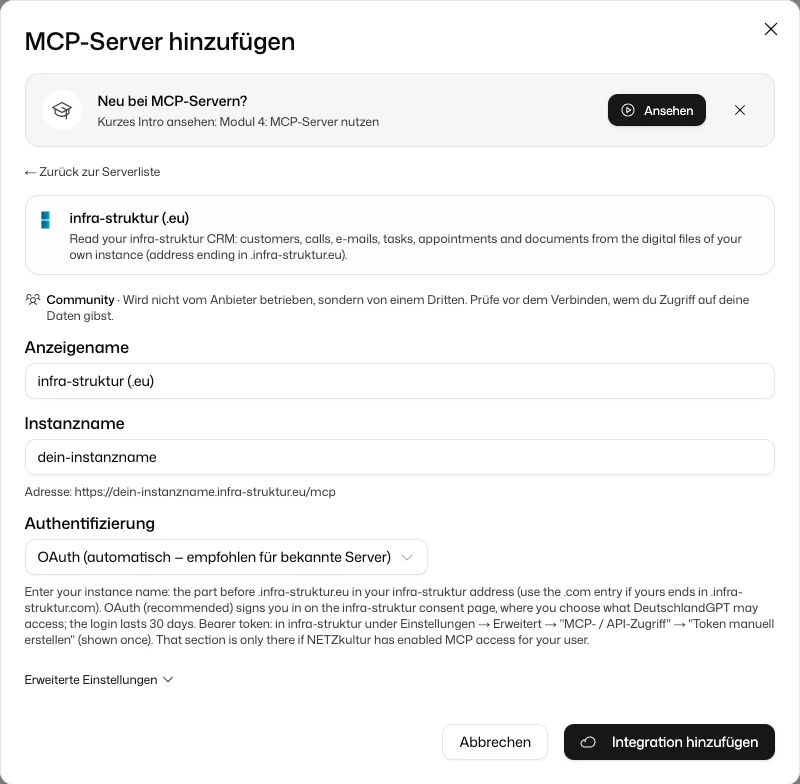
Steps 3 to 5: the “MCP-Server hinzufügen” (Add MCP server) dialog -
Log in with OAuth and add the integration
Leave the setting OAuth under “Authentifizierung” (Authentication) and click “Integration hinzufügen” (Add integration). This lets you later log in directly with your infra-struktur login. This works if the “MCP-/API-Zugriff” (MCP/API access) section is activated for you in infra-struktur under “Einstellungen” (Settings) → “Erweitert” (Advanced).
-
Add the connection
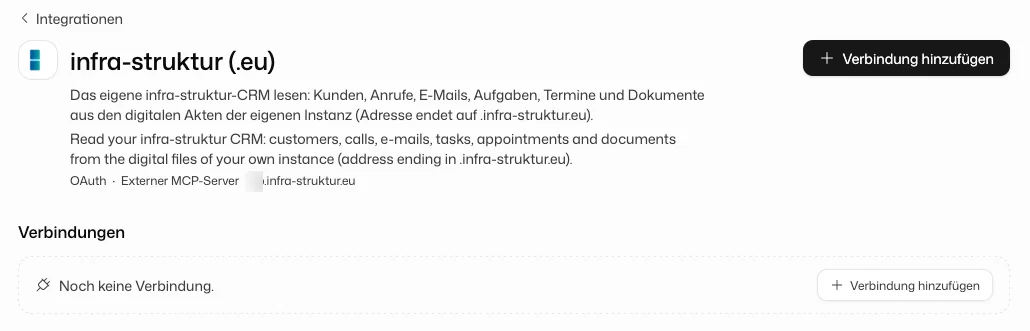
On the “infra-struktur (.eu)” page, click “Verbindung hinzufügen” (Add connection). The approval page of your infra-struktur then opens.
-
Select permissions and allow access
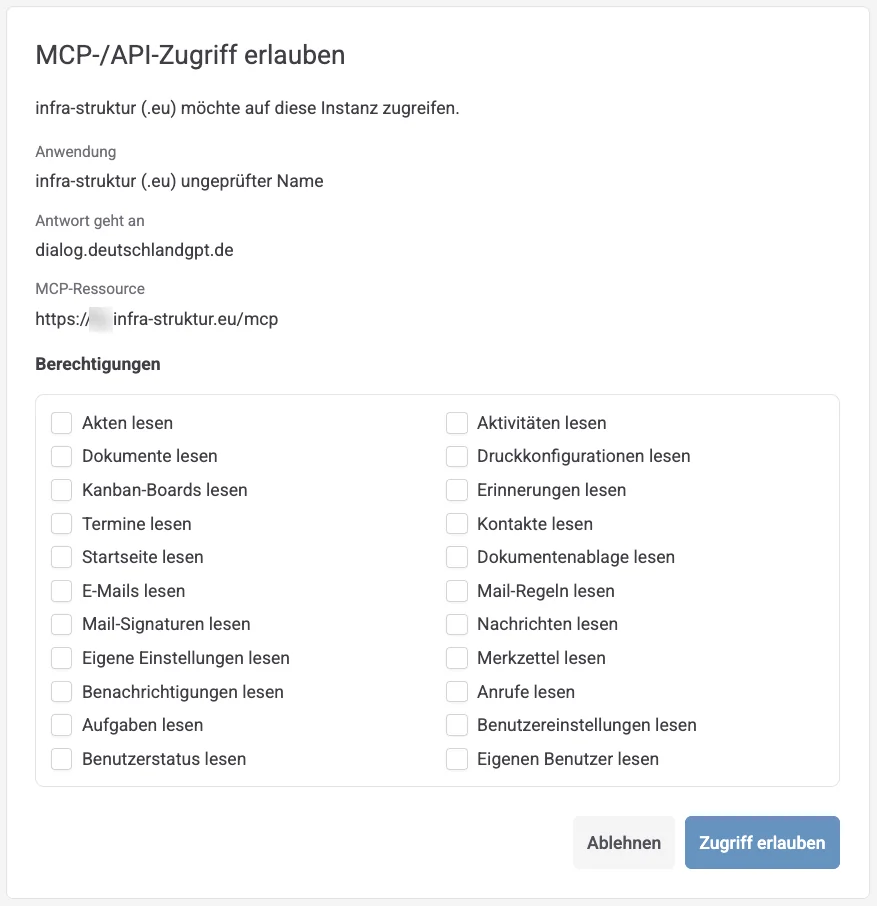
Under “Berechtigungen” (Permissions), tick everything DeutschlandGPT may read, for example records, contacts, e-mails or appointments. Then click “Zugriff erlauben” (Allow access). All permissions are read permissions.
-
Connected and ready to use
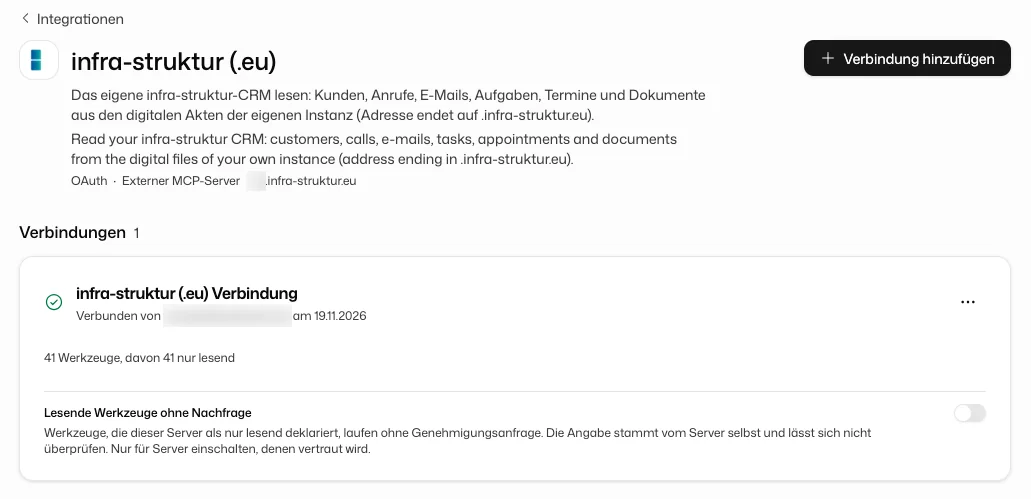
Under “Verbindungen” (Connections), “infra-struktur (.eu) Verbindung” now appears with a green tick. From now on, you can work with the data from your infra-struktur in DeutschlandGPT.
Good to know
Frequently asked questions about the connection to DeutschlandGPT
What is an MCP server?
An MCP server provides data for AI assistants. MCP stands for Model Context Protocol, an open standard. infra-struktur has its own MCP server, through which DeutschlandGPT reads the data you approve.
Which data can DeutschlandGPT read?
DeutschlandGPT only reads the areas you tick in step 7, for example records, contacts, calls, e-mails, tasks or appointments.
Can DeutschlandGPT change data in infra-struktur?
No. All permissions on the approval page are read permissions, so DeutschlandGPT can only read your data.
Does DeutschlandGPT ask before it reads data?
Yes, as long as the switch “Lesende Werkzeuge ohne Nachfrage” (read-only tools without asking) is switched off for the connection. If you switch it on, DeutschlandGPT reads without asking.
I can’t find the “MCP-/API-Zugriff” (MCP/API access) section. What now?
Then MCP access has not yet been activated for your user. Contact our support on 0 29 41 – 27 26 30 or at support@netzkultur.de.
Stuck?
Our support will help you with the setup, Monday to Friday from 08:00 to 17:30.